eget/dra; axe; ColourCreatype
I 💙 it when discovering a new utility begets discovering additional utilities and resources.
That happened with today’s sandwiched section on axe, which had links to the resources mentioned in the first and last ones.
In other news, llama 3.2 is out, and I subbed it for 3.1 in the TL;DR section creation. It’s super-fast and did a fine job on the first try.
TL;DR
(This is an AI-generated summary of today’s Drop using Ollama + llama 3.2 3b and a custom prompt.)
egetanddracommand-line tools simplify GitHub release asset downloads and installations by operating through four phases: finding, detecting, verifying, and extracting assets. (https://github.com/zyedidia/eget)axeis a Rust-based alternative toxargs, focusing on argument processing and ordering, allowing for line-by-line execution and
splitting arguments into parts. (https://github.com/jacek-kurlit/axe)- ColourCreatype offers a range of weather icon sets on the “please donate if you use them” honor system, featuring SVG and PNG formats, catering to users seeking proper icons for various projects. (https://freeicons.io/profile/5790)
eget/dra

eget and dra are command-line tools designed to simplify the process of downloading and installing release assets from GitHub repositories.
eget operates in four distinct phases, each handling a core task of the download and installation process.
In the “find” phase, eget determines the list of assets that can be installed. For repository identifiers, it queries the GitHub API to fetch the list of assets from the release JSON. For direct URLs, it simply returns the URL without additional processing.
The “detect” phase is responsible for identifying the appropriate asset for the target system. It uses regular expressions to match OS and architecture information in asset names, and has support for a wide range of operating systems including Darwin (macOS), Windows, Linux, NetBSD, OpenBSD, FreeBSD, Android, Illumos, Solaris, and Plan9. It also recognizes various architecture types such as amd64, 386, arm, arm64, and riscv64.
During the “verify” phase eget checks the integrity of the downloaded asset. It can verify caller-provided checksums or print checksums on request. It also supports automatic checksum verification if a corresponding .sha256 or .sha256sum file is available.
Finally, the “extract” phase handles the extraction of the downloaded asset. It detects archive type and compression method automatically, and supports various archive formats including .tar.gz, .tar.bz2, .tar.xz, .tar, .zip, and single compressed files (.gz, .bz2, .xz).
dra is a slightly more feature-rich tool. While it has many of the aspects of eget, it also has multiple download modes, including an interactive mode for manual asset selection. And, it can also work with private repositories using a GitHub token and comes with shell completions.
I’d assert dra has just enough extra batteries included that you may want to consider using it in automation settings.
axe
I use xargs quite a bit, but share in the frustrations of it expressed by the author of axe.
This new Rust-based command-line tool is designed as an alternative to said xargs, and places emphasis on argument processing and ordering. Unlike xargs, it lets us specify exactly where arguments appear in a command.
Like xargs, it processes input as a series of data lines, executing the specified command for each line. This makes it especially useful for tasks that require line-by-line processing. Axe also allows for splitting arguments into parts and can resolve arguments into arrays, providing more granular control over input data.
For example, to reorder arguments, you might use:
echo "foo bar baz" | axe echo {2} {1} {0}
This command rearranges the input words when passed to echo. To process input lines individually:
echo "a b c\nd e f" | axe echo {}
This executes echo for each line of input. If you need to split arguments:
echo "file.txt" | axe echo {0.0} {0.1}
And for handling array arguments:
echo "a_b c_d e_f" | axe echo {_0}
There are many ways to get it installed, but I used the following:
$ dra download --output ~/bin --install jacek-kurlit/axe
ColourCreatype
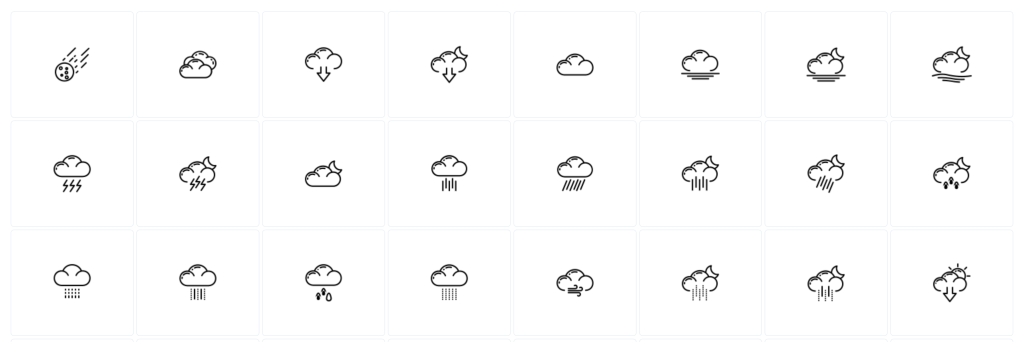
The axe repo called out ColourCreatype’s profile on freeicons.io.
This creator has scads of icon sets that are offered on the “please donate if you use them” honor system.
I’ve been looking for some proper icons (vs. the emojis or SF Symbols I generally rely on) for some of my weather station projects, and kind of like the styling of this collection.
Most (perhaps, “all”, as I only paged through half of the ~70 sets of collections) of the icons come in both SVG and PNG formats.
FIN
Remember, you can follow and interact with the full text of The Daily Drop’s free posts on Mastodon via @dailydrop.hrbrmstr.dev@dailydrop.hrbrmstr.dev ☮️
 hrbrmstr's Daily Drop
Leave a comment