Keeping Up With DuckDB Core Extension Changes: Interactive Mode
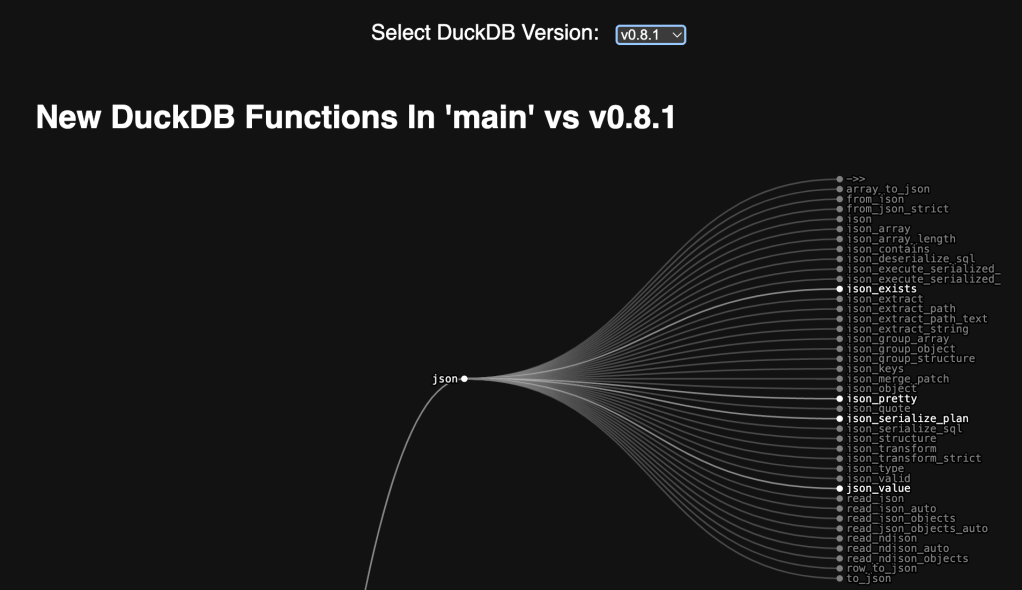
Yes. Two Bonus Drops!
After I finished penning yesterday’s code and Drop, I thought “It’d be cool to see how far DuckDB core extension functions have come!”. (I swear I wasn’t trying to get out of yard work.)
I went down a very bad path of attempting to instrument the GitHub API to iterate through releases, attempting to retrieve the same .hpp file, and adding some interactive functionality to the existing codebase.
Why “bad”?
Well, for starters, it’s alot of API calls, and there are rate limits for unauthenticated requests. Adding in complexity to ask y’all to paste in a GitHub API key seemed, well, ugh.
A decent chunk of those API calls also failed due to that .hpp file not existing until around v0.7.x, too.
And, to make matters worse, the fine folks at DuckDB weren’t using automated source code formatting (I guess we’ll cover clang-format in an upcoming Drop) workflows, so the heuristics the original code used to target the extension function data structure would not work.
Finally, I also got tired of giving GitHub’s API attention.
So, I created a new single page HTML file, and set out to build a shell script we can run in a cronjob or systemd timer to make a CSV file that we’ll use to build the historical “database” of extension functions, and let folks choose which one to compare the main branch to.
Git Ops
If you want to follow along at home, you’ll need to git clone git@github.com:duckdb/duckdb the DuckDB main repo and be in that directory (you can also just run the script that I’ll have a link for in a few paragraphs).
We’re going to need a list of tagged versions and their hashes, since we’re going to retrieve the source for src/include/duckdb/main/extension_entries.hpp. Git makes that pretty easy:
$ git for-each-ref --format '%(objectname) %(refname:short)' refs/tags
…
da9ee490df829a96bfbcfcd737f95f8dbc707d0a v0.4.0
109f932c41fba9d61189e01ab0e5496cb9749506 v0.5.0
7c111322de1095436350f95e33c5553b09302165 v0.5.1
2213f9c946073a6df1242aa1bc339ee46bd45716 v0.6.0
919cad22e8090087ae33625661f26a5fc78d188b v0.6.1
f7827396d70232a0434c91142809deef6e0b6092 v0.7.0
b00b93f0b14bfff869e1facfd86a6b556a6f1c6e v0.7.1
e8e4cea5ec9d1a84c1f516d0f0674f8785a3e786 v0.8.0
6536a772329002b05decbfc0a9d3f606e0ec7f55 v0.8.1
0d84ccf478578278b2d1168675b8b93c60f78a5e v0.9.0
401c8061c6ece35949cac58c7770cc755710ca86 v0.9.1
3c695d7ba94d95d9facee48d395f46ed0bd72b46 v0.9.2
1f98600c2cf8722a6d2f2d805bb4af5e701319fc v1.0.0
We then need to peek inside that work tree of that commit to see if our target file exists. Again, pretty simple:
$ git ls-tree -r "3c695d7ba94d95d9facee48d395f46ed0bd72b46" | \
  grep -q "src/include/duckdb/main/extension_entries.hpp"
(the -q means “be quiet”). The exit value will be 0 if that file exists.
Retrieving that older version of the .hpp file is also pretty simple:
$ git show "3c695d7ba94d95d9facee48d395f46ed0bd72b46:src/include/duckdb/main/extension_entries.hpp"
//===----------------------------------------------------------------------===//
//                         DuckDB
//
// duckdb/main/extension_entries.hpp
//
//
//===----------------------------------------------------------------------===//

#pragma once

#include "duckdb/common/unordered_map.hpp"

// NOTE: this file is generated by scripts/generate_extensions_function.py. Check out the check-load-install-extensions
//       job in .github/workflows/LinuxRelease.yml on how to use it
…
Since not all versions of that file are formatted consistently, we have to do that on our own. So we pipe the output of that to an inline clang-format call:
clang-format -style='{BreakBeforeBraces: Allman, IndentWidth: 4}' --assume-filename=file.cpp -
Now, along with not being formatted consistently, there was a variable name change along the way, so we have to look for both of those in the regex for the start of the block, and a blank line for the end of the block (this is all still in a pipe):
${SED} -n '/static constexpr \(ExtensionEntry\|ExtensionFunctionEntry\) EXTENSION_FUNCTIONS/,/^$/p'
The ${SED} is because I’m still more familiar with GNU sed vs the BSD one that ships with macOS. The source has installation instructions and subs out gsed on macOS for the built-in sed.
We now need to delete the declaration line and the blank line to just focus on the entries (again, still in a pipe):
${SED} '1d;$d;$d'
Now, we turn our backs on grep and call in air support from ripgrep so we can just yank out the pattern matches (still in a pipe):
rg -o '"([^"]+)".*?"([^"]+)"'
And, (still in a pipe) we remove the quotes and comma:
${SED} -e 's/[",]//g'
Altogether, that does this:
$ git show "3c695d7ba94d95d9facee48d395f46ed0bd72b46:src/include/duckdb/main/extension_entries.hpp" | \
  clang-format -style='{BreakBeforeBraces: Allman, IndentWidth: 4}' --assume-filename=file.cpp - |
  gsed -n '/static constexpr \(ExtensionEntry\|ExtensionFunctionEntry\) EXTENSION_FUNCTIONS/,/^$/p' |
  gsed '1d;$d;$d' |
  rg -o '"([^"]+)".*?"([^"]+)"' |
  gsed -e 's/[",]//g'
->> json
array_to_json json
create_fts_index fts
current_localtime icu
current_localtimestamp icu
dbgen tpch
drop_fts_index fts
dsdgen tpcds
excel_text excel
from_json json
from_json_strict json
from_substrait substrait
…
Before all that, we echo out a header, then echo out a CSV line in a while loop.
You can find that all bundled up in extension-function-history.bash. The CSV it makes looks like this:
version,function
v0.10.0,DuckDB/json/->>
v0.10.0,DuckDB/parquet/add_parquet_key
v0.10.0,DuckDB/json/array_to_json
v0.10.0,DuckDB/fts/create_fts_index
…
Web Ops
In retrospect, I really should have used Observable Framework for this.
OK, I did. (Source) It’s slightly optimized to just do a “git pull” vs. re-clone every time.
The code Observable Notebook version shows how little work it would have been.
But, I haven’t made anything with Lit in a while, so I decided to exercise that muscle a bit. You can review the full ~200 line source in all.html.
It uses the semver JS package to help reverse sort the version tags.
And, you can interact with the whole thing here.
FIN
Git is great at making data sources out of both work tree metadata, and work tree objects.
It’s also kind of nice wrangling data without relying on R or Python and all the needless dependencies that would have come along for the ride.
Remember, you can follow and interact with the full text of The Daily Drop’s free posts on Mastodon via @dailydrop.hrbrmstr.dev@dailydrop.hrbrmstr.dev ☮️
 hrbrmstr's Daily Drop
Leave a comment