The User Is On Their Own; An Oral History Of The Hamburger [Icon]; The Long Alt[-Text] Of The Law
Happy Mum’s Day to any and all mums out there in Drop land!
It’s very likely many readers are busy engaged in mum-related weekend engagements, so we’ll give you some longer-form articles to pore over, tomorrow, with your morning hot (or cold) [de]caffeinated beverage in hand. Each is related to tech and/or “design” in some way, and will hopefully provide some food for thought (as you sip said beverage).
TL;DR
No TL;DR today (well, there’s one embedded in one of the sections) as I’m working on using llamafile vs Perplexity and need to finish tweaking the script for it. We’ll be covering llamafile this week (in the event that term/program is not familiar to folks).
The User Is On Their Own
Esther Weidauer is musician, writer and artist living in Berlin. Esther has also managed to escape the shackles of a tech career and is working on becoming a psychologist. Oddly enough, that puts her in a great position to look at various things in tech with a keen, critical eye.
In “The User Is On Their Own“, she discusses the concept of intuitive user interfaces and argues that very few things in life are truly intuitive (Don Norman might vehemently agree!). In the piece, she explains that intuitive interfaces should allow users to figure things out with reasonable effort, but notes that this definition is subjective and depends on the task at hand.
A great example she uses is that of a power drill and how only a small percentage of people knew/know what the rotary dial does (you should tap the link just to read that part), despite the device being commonly used.
As technology becomes more complex, it is unrealistic to expect folks to figure things out on their own without instruction or guidance. Esther makes a pretty convincing argument that expresses doubts about the feasibility of creating interfaces that are so simple and intuitive that anyone can learn them on their own. She concludes with some advocacy around community support, good documentation, and accessible learning resources instead.
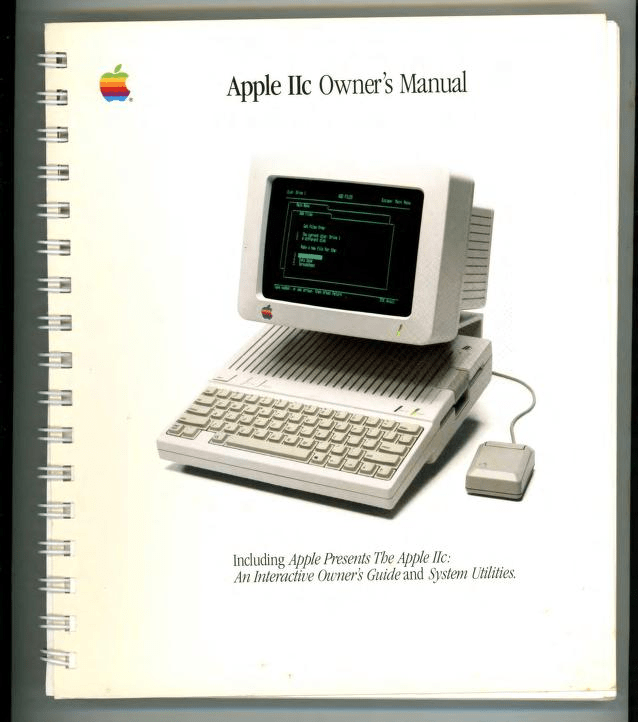
As someone who grew up with programs on actual disks and bound (proper, or spiral) manuals, I share many of Weidauer’s sentiments. Even Apple has strayed far away from their original roots. The section header shows the manual that came with the Apple IIc, but Apple even had wonderful developer manuals, with extensive guides for how to build human-computer interfaces. I regularly talk smack on Apple, since it is becoming very “linux-ified”. That is, the attention do detail, consistency amongst apps, and overall UX composition is degrading rapidly. If I were to bring up the Mission Control view on any given day, folks on the original design teams at Apple would likely turn feral and start seeking out those responsible for the atrocities seen on the screen. Glorified web pages caged in Electron; iPadOS and iOS apps shoved into a compatibility view to get app store app count up and help lazy developers increase their install base, and every developer thinking they know better, while confusing the humans behind the screen with non-standard keyboard shortcuts, floating palettes.
I also think this applies even more, today, to data visualizations — especially interactive ones. While I make this promise to myself every year, this year I really better start doubling down on the annotations, and, perhaps, include a “how to read” with every non-casual chart drop.
Rest assured, if you feel confused using a given app or web site, you are most certainly not alone. i.e., it’s not you, it’s them.
An Oral History Of The Hamburger [Icon]

Once you dig into the soon-to-be-dropped-link you’ll see why I’m including this article right after the first section. You’ll also see — after readint this section — that I’m in the “anti-hamburger” tribe. Oh, and, I’ll bet you didn’t know it’s a 40+-year-old UI atrocity.
The hamburger menu icon, consisting of three horizontal lines (in theory) resembling a hamburger, first appeared in 1981 in the user interface of the Xerox Star. It was designed by Norm Cox, the lead visual designer for the Xerox Star project (imagine this icon being your legacy).
The post, by Dale Berning Sawa — a London-based freelance writer — covers the full history of the these three lines, which is (again, in theory) a commonly grok’d symbol used in user interfaces for hiding additional options. She goes into the details of how Cox and the he team were trying to make the computer interface more user-friendly by using graphics instead of text-based commands. Throughout this new interface they were creating, they used symbols inspired by real-world objects and the hamburger menu was used to represent a pop-down menu.
invision’s Indie Design (the site Dale’s post is on) has another post looking at the pro’s and con’s of this menu. When Cox and the Star team were making their new GUI-based operating system environment, they did have manuals, which explained this menu. When the menu resurfaced in the 2000’s, there were no menus, and also no “onboarding” interface automation that you see on higher end sites. So, you had to blindly click around to grok what it did, and are just lucky — on any give site — it doesn’t mean “delete all your stuff without confirmation”.
The Long Alt[-Text] Of The Law

I learned just how much I didn’t know about alt-text from this post by Adrian Roselli.
Atrian’s post goes deep into importance of keeping alternative text for images brief and accessible. Long alternative texts can cause issues for us humans, including folks who use screen readers and those with slow internet connections. There are some great examples (which use the cat image in the section header) that visually show what can go terribly wrong by folks who may mean well (if you’re using alt-text, you’re very likely a good human).
As Roselli puts right up front: “TL;DR: Keep your image alternative text brief, devoid of special characters, empty of URLs, and ideally in one language.” However, I encourage you to dig into the whole thing. I can almost guarantee you’ll learn something new and valuable.
FIN
Remember, you can follow and interact with the full text of The Daily Drop’s free posts on Mastodon via @dailydrop.hrbrmstr.dev@dailydrop.hrbrmstr.dev ☮️
 hrbrmstr's Daily Drop
Leave a comment