COLRv1; Prime Color; Nabla
I came across the middle resource in a demo about using variable fonts with sound to visualize (“sonify”) the typography in an HTML page. But, before we take a look at that, we have to talk about the COLORv1 standard (we’ve dicussed other color font concepts in previous TT Drops). And, we’ll close with another super fun COLORv1 font.
TL;DR
(This is an LLM/GPT-generated summary of today’s Drop. This week, I continue to play with Ollama’s “cloud” models for fun and for $WORK (free tier, so far), and gave gpt-oss:120b-cloud a go with the Zed task. Even with shunting context to the cloud and back, the response was almost instantaneous. They claim not to keep logs, context, or answers, but I need to dig into that a bit more.)
- COLRv1 enables scalable, gradient‑rich color fonts via vector layers and a shared color table, allowing dynamic palette changes through CSS (https://github.com/googlefonts/colr-gradients-spec/blob/main/colr-gradients-spec.md)
- Primecolor is a free Open Font License typeface using OpenTypeSVG and COLRv1 to deliver animated, multi‑color lettering directly in browsers (https://www.glukfonts.pl/fontface/Primecolor_anim/index.html)
- Nabla is a vintage‑arcade‑inspired COLRv1 color font with 3D isometric glyphs and gradient effects, currently best supported in Chromium browsers (https://nabla.typearture.com/)
COLRv1

COLRv1 is a font format that’s been around since ~2022 and lets text be colorful, flexible, and infinitely scalable—all without losing sharpness. Instead of storing colors as fixed pixels or baked-in SVG fills, it uses vector shapes layered together and linked to a shared color table. That means each letter is built from multiple outlines, each one using a color, gradient, or blend mode from that palette. When you type, those layers stack and blend into a single, vibrant character.
Because the colors are referenced instead of locked in, developers can change them through CSS or code without altering the font itself. Want a dark mode version or a seasonal theme? Just swap out the color palette. COLRv1 also supports gradients, transparency, and animation-ready font variations—so letters can shift, fade, or pulse smoothly.
It’s a big step up from COLRv0, which only handled solid fills. The newer version adds gradient fills, blending options like multiply and overlay, and compositing tricks that let shapes paint within other shapes. All of this comes in a compact file that browsers handle efficiently. While desktop app support hasn’t fully caught up, COLRv1 is already making the web’s typography feel a lot more alive and expressive.
You read more about it in this introduction to Chrome 98, and can even build your own with this helpful utility!
Prime Color

Primecolor is a color typeface created by the Polish designer gluk, known for experimenting with the boundaries of font technology. It’s built in several OpenTypeSVG variants—R, G, B, and M—that bring layered color directly into the lettering itself, rather than relying on external effects. These versions work in modern design tools such as Adobe’s Creative Cloud suite and Inkscape, where each character appears as a vivid, dimensional object rather than flat ink on a page. The attention to detail in its forms gives it a polish that feels intentional without becoming ornamental.
Primecolor takes full advantage of the COLRv1 format through the Primecolor-CV1 variable webfont. This format allows fonts to display multiple colors, gradients, and transparency directly in browsers, no raster images needed. When viewed in Chrome, Firefox, Edge, or Opera, the type seems to shift and glow with life, showing what’s possible when typography meets real-time rendering. The demo on gluk’s site lets anyone play with the font, typing and watching the colors blend and move dynamically. View source to see how the animations are made (it’s vanilla JA) and defintely tap the 🩶 icon in the header, too.
Primecolor is free to use under the SIL Open Font License, and would work great in vintage poster context or even a sleek, modern web banner.
Nabla
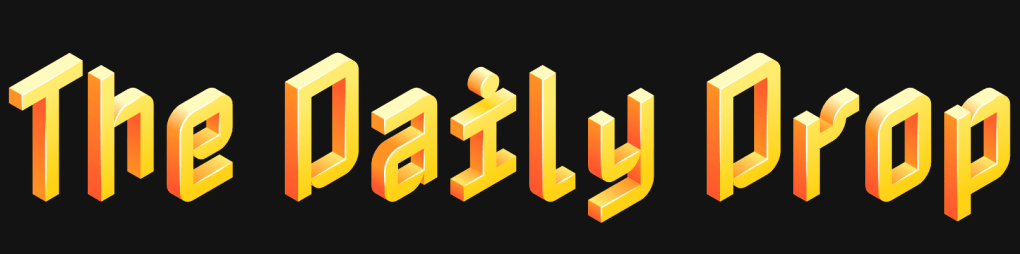
Nabla (GH) (GF) is a typeface that feels like it leapt straight out of a vintage arcade game and into the future. It’s another clever color font that imparts every letter shape with tiny piece of artistic flare with gradients, shadows, and depth baked right in. The designers, Arthur Reinders Folmer and Just van Rossum, used an isometric cube as the foundation, giving the font a 3D, blocky look that feels tactile and dimensional—almost like you could reach out and stack the letters. My first impression of it was “pixel art evolving into a hologram”.
It, too, takes ridiculously cool advantage of the aforementioned COLRv1. So, we can tweak the lighting, depth, and even the color scheme, turning each word into its own little piece of design. Right now, it only works really well in Chromium browsers, but more browsers are catching up.
I now have to find a project to use this in.
FIN
Remember, you can follow and interact with the full text of The Daily Drop’s free posts on:
- 🐘 Mastodon via
@dailydrop.hrbrmstr.dev@dailydrop.hrbrmstr.dev - 🦋 Bluesky via
https://bsky.app/profile/dailydrop.hrbrmstr.dev.web.brid.gy
☮️
 hrbrmstr's Daily Drop
Leave a comment