kitty; CEF; awrit
The tagline for today’s Drop will become apparent pretty quickly.
TL;DR
(This is an AI-generated summary of today’s Drop using Ollama + llama 3.2 and a custom prompt.)
- Kitty is a cross-platform GPU-accelerated terminal emulator that delivers high performance terminal operations using SIMD vector CPU instructions (https://sw.kovidgoyal.net/kitty/)
- The Chromium Embedded Framework (CEF) is an open-source framework for embedding a Chromium-based web browser within an application, providing modern web browsing capabilities (https://bitbucket.org/chromiumembedded/cef/src/master/)
- awrit is an alchemic blend of CEF and kitty’s graphics rendering protocol, allowing for actual web rendering in terminals that support kitty’s protocol (https://github.com/chase/awrit)
kitty

It would take quite a bit to pry me away from WezTerm at this point, but we need to cover kitty (GH) so we can cover the topic of the last section.
Kitty is a cross-platform GPU-accelerated terminal emulator that also sports Single Instruction, Multiple Data (SIMD) vector CPU instructions to deliver high performance terminal operations.
I shall digress for a moment, since that four-letter acronym (SIMD) is appearing at a higher frequency, of late. You can think of it as a super-efficient assembly line for data processing. Instead of handling one piece of data at a time, SIMD lets a computer process multiple pieces of data all at once with a single command.
A classic SIMD example is adjusting the brightness of every pixel in a photo. SIMD lets us pack multiple pieces of data into special wide “registers”, apply one operation that affects all the data simultaneously, thus completing the task in fewer steps than processing each piece individually. This is a pretty accessible resource on SIMD.
Back to our regularly scheduled section…
Kitty further employs threaded rendering (along with the aforementioned GPU acceleration and SIMD ops) to handle complex terminal operations efficiently. This becomes measurably evident when you have large amounts of scrollback buffer content or when you ask kitty to render complex Unicode characters.
It has robust support for ligatures and emoji rendering; offers extensive Unicode support and can handle sophisticated graphics protocols.
You can, if you are a monster, extend kitty with Python scripting, both in terms of customization and task automation. Kitty’s “API” provides access to programmable tabs and window management capabilities.
Kitty also includes some neat features for remote computing, letting us edit and download files within existing SSH sessions. This capability also integrates well with various command-line tools and editors.
I could go on, but the main site does a great job showcasing what kitty can do. You should strongly consider keeping it around (I do), and will need it to play with the tech in the last section.
CEF

We also need to cover this resource before hitting the pièce de résistance.
The Chromium Embedded Framework (CEF) (W) is an open-source framework that lets us embed a Chromium-based web browser within an application. Created by Marshall Greenblatt in 2008, CEF is actively maintained and provides a simplified way to integrate modern web browsing capabilities into desktop software.
It has cross-platform support for Linux, macOS, and Windows, along with language bindings for C, C++, Go, Java, Python, and a few others. Since it’s Chromium under the hood, there’s the standard HTML5, CSS, and JavaScript support for building application interfaces. It even ships with Google’s PDFium renderer.
If you’ve ever used Spotify’s desktop app, you’ve used CEF, and the aforelinked Wikipedia page shows many other apps and organizations that use CEF.
Covering any more of CEF would mean starting a whole coding project, so we’re just going to move on to an existing coding project that uses it super well.
awrit
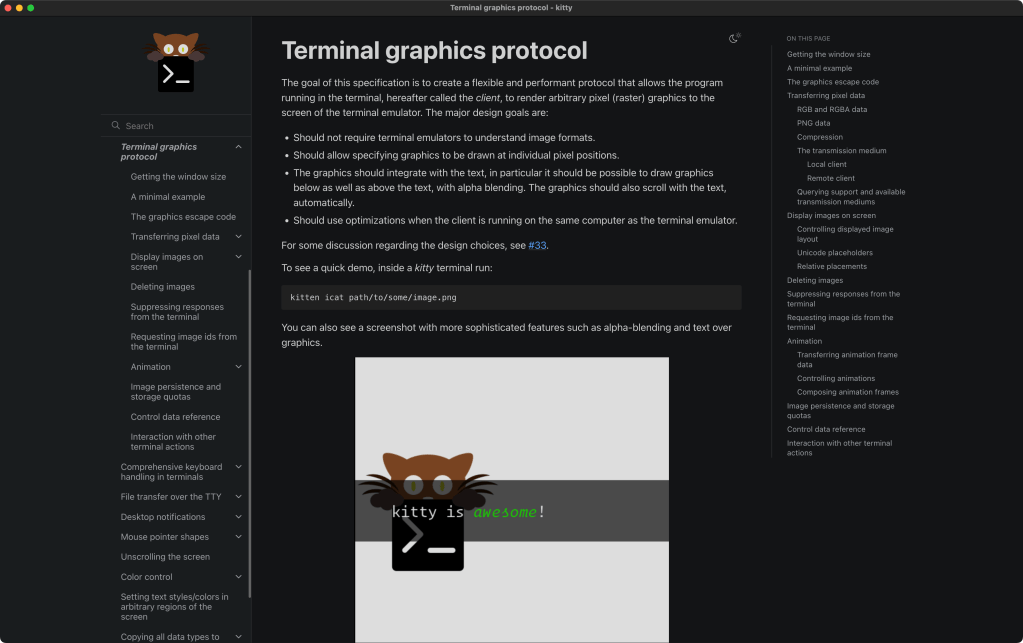
Actual Web Rendering in Terminal (awrit) is an alchemic blend of the Chromium Embedded Framework and kitty’s amazing graphics rendering protocol. While it may work in terminals that support kitty’s protocol, I heeded the developer’s note and have only tried using it with kitty-proper.
The image from the section header is a bona-fide kitty screenshot after entering:
$ awrit https://sw.kovidgoyal.net/kitty/graphics-protocol/
at a terminal prompt in kitty.
If a URL is not provided, awrit will go to its homepage. For now, only http, https, and data URIs are supported, and it defaults to https if you use a bare domain’d URL.
The macOS version weighs in at ~270 MB and has this browser signature:
Mozilla/5.0 (Macintosh; Intel Mac OS X 10_15_7) AppleWebKit/537.36 (KHTML, like Gecko) Chrome/120.0.0.0 Safari/537.36
While you can fully interact with a page/site after bringing it up, don’t expect it to behave like a full browser app. The use case seems to be aimed at web developers who want to stay in a a terminal environment to preview creations.
awrit does not fare very well on sites that rely heavily on JavaScript (it froze on a fairly uncomplex Observable notebook for me), and has not seen any developer 💙 since early in 2024. Still, being able to quickly (it launches fast) see web content in a terminal context is pretty handy.
2025 is going to be an interesting year when it comes to browser technology, and I hope there are more creative experiments like this one to help us keep our options open in what is a pretty monopolistic ecosystem.
FIN
We all will need to get much, much better at sensitive comms, and Signal is one of the only ways to do that in modern times. You should absolutely use that if you are doing any kind of community organizing (etc.). Ping me on Mastodon or Bluesky with a “🦇?” request (public or faux-private) and I’ll provide a one-time use link to connect us on Signal.
Remember, you can follow and interact with the full text of The Daily Drop’s free posts on:
- 🐘 Mastodon via
@dailydrop.hrbrmstr.dev@dailydrop.hrbrmstr.dev - 🦋 Bluesky via
https://bsky.app/profile/dailydrop.hrbrmstr.dev.web.brid.gy
Also, refer to:
to see how to access a regularly updated database of all the Drops with extracted links, and full-text search capability. ☮️
 hrbrmstr's Daily Drop
Leave a comment