Restish; RFC Metadata; Finicky (macOS-only)
In this edition of Bonus Drop, we explore three tools that enhance some workflows and online security, including a versatile CLI for API interactions to a method for easily accessing RFC metadata, and finally a macOS utility for managing browser usage.
TL;DR
(This is an AI-generated summary of today’s Drop using Ollama + llama 3.1b and a custom prompt.)
- Restish is a powerful CLI tool for interacting with REST APIs, offering features like HTTP/2 support, OpenAPI integration, and alignment with multiple RFC standards (https://rest.sh/#/)
- IETF provides a JSON endpoint for retrieving RFC metadata, accessible via https://datatracker.ietf.org/doc/rfc####/doc.json
- Finicky is a macOS application that allows granular control over which browser opens specific URLs, helping users manage privacy and security concerns (https://github.com/johnste/finicky)
Restish

Restish (GH) is a CLI tool specifically designed for interacting with, well, REST-ish HTTP APIs. It has a staggering range of features that streamline and enhance the experience of working with APIs.
First, off the tool is “HTTP/2-first” and “TLS-first” by default. This means it will try modern web communication standards before falling back to HTTP/1.1 when necessary. This ensures faster and more efficient communication with APIs that support the newer protocol.
It’s also designed to fully grok OpenAPI (a.k.a., “Swagger”) specs along with JSON Schema. If you point it at those specs for a given API, it will gain some serious superpowers as it will then understand the structure and operations of the APIand let you call API operations by name rather than specifying full URLs. This makes restish-ops far more intuitive and easier to remember than, say, curl-ops. Restish can also process a cadres of content types, including JSON, YAML, CBOR, MessagePack, and Amazon Ion.
It supports multiple authentication methods, including OAuth 2, and can automatically configure API authentication if it’s advertised by the API. This dramatically simplifies the process of setting up “secure” connections to APIs.
Restish also implements local caching in accordance with RFC 7234, respecting Cache-Control and Expires headers. This helps improve performance by reducing unnecessary network requests when data hasn’t changed.
In fact, Restish deliberately baked-in alignment with a host of standards:
- Brotli Compressed Data Format (RFC 7932)
- Concise Binary Object Representation (CBOR) (RFC 7049)
- DEFLATE Compressed Data Format Specification version 1.3 (RFC 1951)
- GZIP file format specification version 4.3 (RFC 1952)
- Hypertext Transfer Protocol (HTTP/1.1): Caching (RFC 7234)
- Hypertext Transfer Protocol Version 2 (HTTP/2) (RFC 7540)
- Link Relation Types for Web Services (RFC 8631)
- Proof Key for Code Exchange by OAuth Public Clients (RFC 7636)
- The JavaScript Object Notation (JSON) Data Interchange Format (RFC 8259)
- The OAuth 2.0 Authorization Framework (RFC 6749)
- Web Linking (RFC 5988)
Some APIs have pretty complex data structures, and Restish provides some shorthand for this structured data input. That makes it easier to send nested data to APIs without crafting intricate JSON or YAML files manually.
I like to think of Restish as if either curl or HTTPie came with many more batteries included.
“Um, hrbrmstr: why no examples?”
Well, the docs are nothing short of amazing. Daniel (and I’m assuming one or more of the dozen or so contributors) did a phenom job putting together comprehensive examples and explanations for all the capabilities the tool has to offer. Anything I put here would pale in comparison.
Daniel wrote a short blog on the tool, as well.
If you need to machinate a new OpenAPI REST API, I heartily suggest giving this a go before trying your usual methods.
RFC Metadata

I post about RFC’s often enough that I’ve got a quick method for prepending https://datatracker.ietf.org/doc/html/rfc to individual RFC numbers.
Today, I needed names and URLs for the RFCs in the previous section, and figured there had to be a better way than some manual cut/paste ops.
It turns out you can get juicy metadata for all RFCs via a simple, unauthenticated JSON endpoint. Just sub in the actual RFC number for the #### in: https://datatracker.ietf.org/doc/rfc####/doc.json, and you’ll get some well-structured JSON back. Here’s the IETF RFC JSON for, um, JSON:
$ curl --silent https://datatracker.ietf.org/doc/rfc8259/doc.json | jq
{
  "name": "rfc8259",
  "rev": "",
  "pages": 16,
  "time": "2018-12-20 08:31:48",
  "group": {
    "name": "Javascript Object Notation Update",
    "type": "WG",
    "acronym": "jsonbis"
  },
  "expires": null,
  "title": "The JavaScript Object Notation (JSON) Data Interchange Format",
  "abstract": "JavaScript Object Notation (JSON) is a lightweight, text-based, language-independent data interchange format. It was derived from the ECMAScript Programming Language Standard. JSON defines a small set of formatting rules for the portable representation of structured data.\n\n This document removes inconsistencies with other specifications of JSON, repairs specification errors, and offers experience-based interoperability guidance.",
  "state": "Published",
  "intended_std_level": null,
  "std_level": "Internet Standard",
  "authors": [
    {
      "name": "Tim Bray",
      "email": "tbray@textuality.com",
      "affiliation": "Textuality"
    }
  ],
  "shepherd": null,
  "ad": "Alexey Melnikov <aamelnikov@fastmail.fm>",
  "rev_history": [
    {
      "name": "draft-ietf-jsonbis-rfc7159bis",
      "rev": "00",
      "published": "2015-10-19T15:39:34+00:00",
      "url": "/doc/draft-ietf-jsonbis-rfc7159bis/00/",
      "pages": 15
    },
    {
      "name": "draft-ietf-jsonbis-rfc7159bis",
      "rev": "01",
      "published": "2016-06-12T18:39:23+00:00",
      "url": "/doc/draft-ietf-jsonbis-rfc7159bis/01/",
      "pages": 15
    },
    {
      "name": "draft-ietf-jsonbis-rfc7159bis",
      "rev": "02",
      "published": "2016-06-16T03:42:37+00:00",
      "url": "/doc/draft-ietf-jsonbis-rfc7159bis/02/",
      "pages": 15
    },
    {
      "name": "draft-ietf-jsonbis-rfc7159bis",
      "rev": "03",
      "published": "2017-02-20T01:09:52+00:00",
      "url": "/doc/draft-ietf-jsonbis-rfc7159bis/03/",
      "pages": 14
    },
    {
      "name": "draft-ietf-jsonbis-rfc7159bis",
      "rev": "04",
      "published": "2017-07-19T13:45:10+00:00",
      "url": "/doc/draft-ietf-jsonbis-rfc7159bis/04/",
      "pages": 15
    },
    {
      "name": "rfc8259",
      "rev": "rfc8259",
      "published": "2017-12-13T19:17:20+00:00",
      "url": "/doc/rfc8259/"
    }
  ],
  "stream": "IETF"
}
You can read a tad more about this and other IETF Datatracker APIs on their notes page.
For those interested, I had already made the markdown list for the direct document URLs, but I made the link names via:
rfcs <- c(1951, 1952, 5988, 6749, 7049, 7234, 7540, 7636, 7932, 8259, 8631)

rfcs |>
  lapply(
    (rfc) httr::GET(url = sprintf("https://datatracker.ietf.org/doc/rfc%s/doc.json", rfc))
  ) |>
  lapply(
    httr::content, as = "text", encoding = "utf-8"
  ) |>
  lapply(
    jsonlite::fromJSON
  ) -> rfc_meta

sprintf(
  fmt = "%s (%s)",
  sapply(y, `[[`, "title"),
  sapply(y, `[[`, "name") |>
    sapply(toupper, USE.NAMES = FALSE) |>
    sub("RFC", "RFC ", x=_)
) |>
  clipr::write_clip()
While that may have taken up as much time as a copy/paste of titles from the URL pages, now it’s a snippet (that I enhanced to make markdown list items with URLs) I can use anytime I need a list of RFCs with names/links.
Finicky (macOS-only)
Using a browser to access internet resources now represents a clear and present danger to privacy and safety. Google has fully weaponized Chrome and Chromium to the point where customized browsers such as Arc and Vivaldi are no longer able to keep us safe from predatory and sociopathic advertising and malicious embedded resources. Firefox is a joke of a browser, managed by an organization that nobody should trust, and WebKit is controlled by Apple (which says it all right there).
I’ve managed to cobble together a combo of Chrome extensions that gets the browser close to the safety levels of pre-Manifest v3 Chrome, but this has broken way more sites than I had expected it to (most of them work-related).
I actually need to use some sites in Chrome, while others work fine in my default — Safari Technology Preview (I’ve had to abandon SigmaOS for the moment, as it’s just “buggy” for daily use) — but I need to use Safari-proper for others.
Having to deal with that manually is a pain.
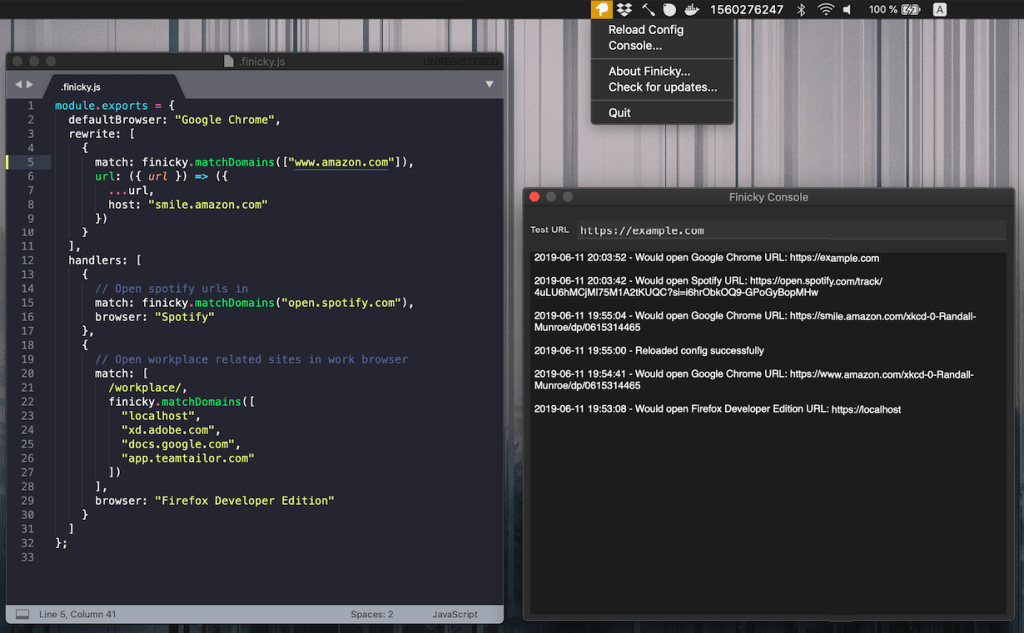
Thankfully, Finicky enables granular control over which browser opens specific links or URLs. You just set up rules in a JavaScript-config that determine which browser or app opens particular URLs. It also offers URL rewriting, letting us modify links before they’re opened (if you noticed the dev[.]to rewrite hack in the first section, that’s now a Finicky rule for me to avoid that site’s skeezy practices).
To set up Finicky, you can download the latest release and place it in your Applications folder. After installation, create a .finicky.js file in your home directory and use JavaScript to define your rules and behaviors (they provide solid examples). Once configured, start Finicky and set it as your default browser to activate its features.
Until we have a true third-party browser choice managed by a reputable org/consortium, we’re stuck doing the best we can to protect ourselves with the scant few tools we have.
FIN
Drop a reply or a private note if you’d like other examples.
Remember, you can follow and interact with the full text of The Daily Drop’s free posts on Mastodon via @dailydrop.hrbrmstr.dev@dailydrop.hrbrmstr.dev ☮️
 hrbrmstr's Daily Drop
Leave a comment