I Know Where You Prompted Last Summer; Perplexica; 🤗 🍎 🦮
The Drop’s occasional AI-oriented edition is back with some meta-info on who is swiping their cards at which ~$20/month AI portals, a look at a self-hosted version of Perplexity(!!), and a great resource for Mac folks wanting to do AI work on Apple Silicon.
TL;DR
(This is an AI-generated summary of today’s Drop.)
And, proper inline links are randomly back!
- This section discusses how companies are rapidly adopting AI tools like ChatGPT and Perplexity, with AI spending growing 293% last year according to a report from Ramp (https://ramp.com/reports/q1-2024-business-spending-benchmarks/), as businesses invest heavily in AI to drive efficiency and unlock new revenue streams.
- This section introduces Perplexica (https://github.com/ItzCrazyKns/Perplexica), an open-source alternative to Perplexity that allows users to run local language models and perform web searches using different modes, ensuring access to the latest information.
- This section mentions resources for running HuggingFace and deep learning models on Apple Silicon Macs, including a guided tour (https://github.com/domschl/HuggingFaceGuidedTourForMac/) and projects like MLX (https://github.com/ml-explore/mlx) and CoreNet (https://github.com/apple/corenet).
I Know Ramp Knows Where You Prompted Last Summer

I’m not sure how many folks realize all of what happens when you tap that NFC-enabled device, insert that credit card, or press the “check out” button in that e-storefront site/app. Sure, folks know the overt things that happen — one comes away fiscally poorer, but also having at least received some good or service. But, you also give away a ton of metadata to the store and the sleazy financial institution that backs the transaction you made. Some stores even have an arrangement with the processors whereby they receive detailed information on what you purchased.
Ramp is a credit card bank/service that targets startups, but also has its fair share of hip SMBs and mid-market firms in their customer portfolio. Recently, they released a “Q1 Business Spending Report“, and made a special blog post — “AI spending grew 293% last year. Here’s how companies are using AI to stay ahead” — that takes a look at what AI overlords business money is flowing to.
The rapid adoption of AI tech is eerily reshaping the business landscape, with companies investing heavily to stay ahead of the artificially created curve. According to Ramp, AI spending grew a bonkers 293% last year, reflecting on just how well the hype cycle has worked.
Organizations seem to be betting big on AI. Ostensibly — if one believes the hype — this is to “drive efficiency”, “enhance decision-making”, and “unlock new revenue streams”. I mean, your org just has to build a hallucinating chatbot that let’s me ask it to write some Go code for me (after I break through the very weak prompt barriers you attempted to construct)…right?
Now, Ramp is pretty much tracking spend on services such as ChatGPT, Perplexity, Anthropic, and other places that let you trade in your credit card numbers for the ability to create creepy six-fingered human images and write your TPS reports for you. Ramp notes that _”over a third of Ramp customers now pay for at least one AI tool compared to 21% one year ago. The average business spent $1.5k on AI tools in Q1, an increase of 138% year over year and evidence that companies using AI are seeing clear benefits and doubling down.”
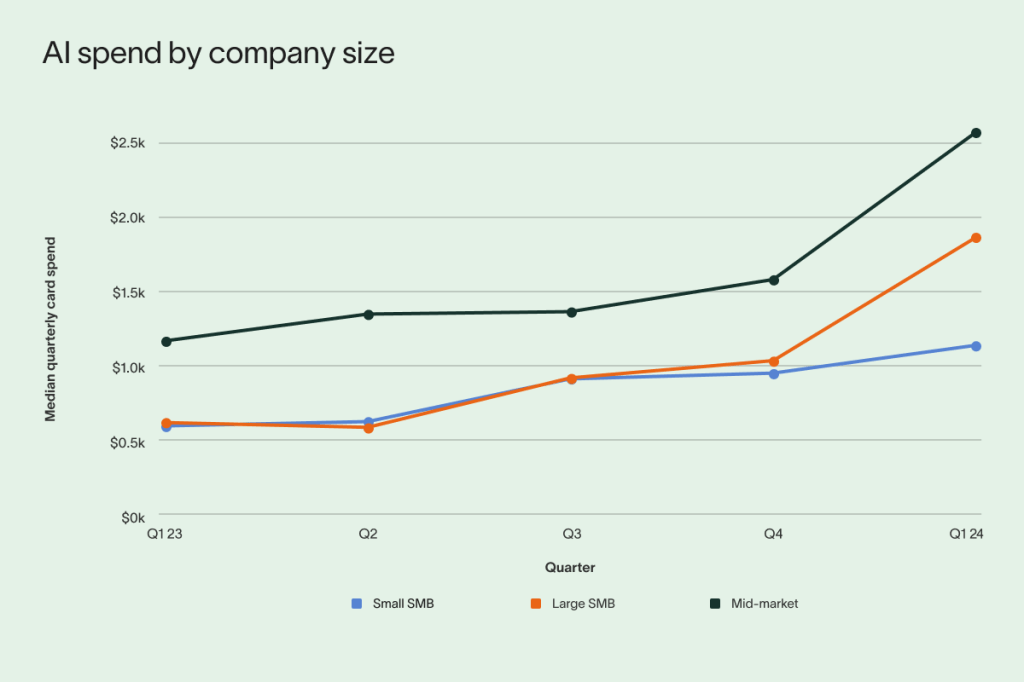
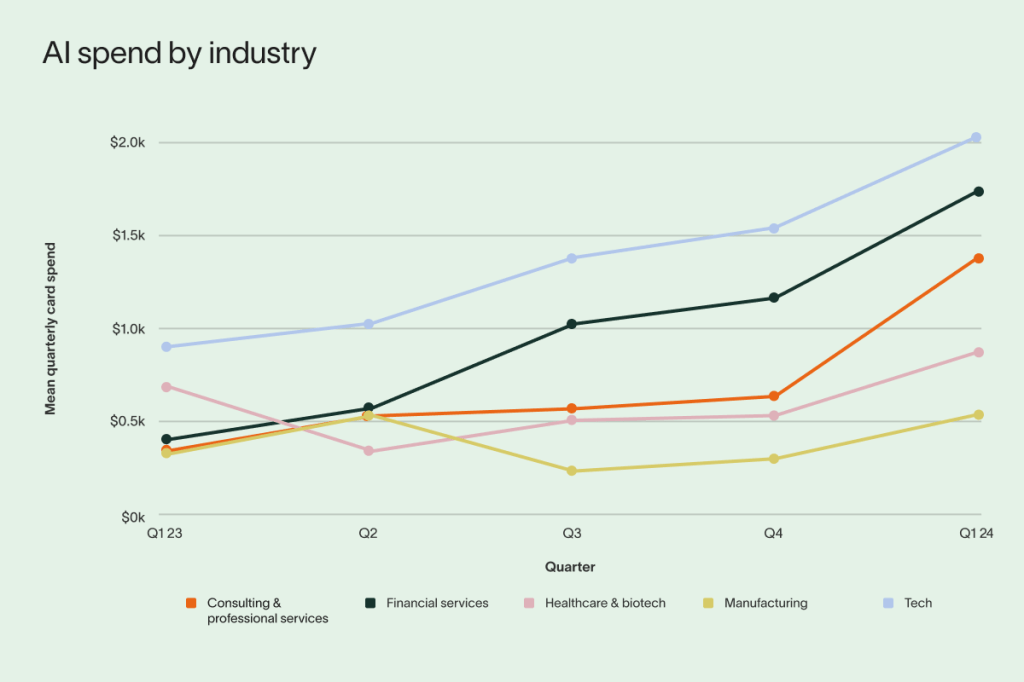
They further note that this spending has pretty much leveled off in Q1 2024, with spending growth inching up just 3% (vs. the peak of 45% growth in Q2 2023). Healthcare and biotech sector saw the largest year-over-year increase in the number of companies transacting with AI vendors (131%), while tech saw the slowest growth (45%).
Ramp goes on to note that non-IT firms are now doing more “investing” in AI than IT-centric ones (likely in a futile attempt to not have to deal with IT folks anymore).
And, if you’re looking to see the $15-20 per-month GPT leaderboard, Ramp also has you covered:

They’ve got more info to drop on you, so head on over to their blog/report if you are AI$-curious.
As with all vendor reports of any kind, read it with some skepticism, since they — like most companies — have many biases in their data.
Perplexica

It’s no secret that I 💙 Perplexity. Being able to have a research assistant who can compile a list of links for me and write a summary of them by digesting and stochastically regurgitating the content from them saves quite a bit of time (though I still mostly Kagi things on my own).
Perplexity claims not to use a third-party search engine. But, I’ve never seen PerplexityBot in my web logs, yet have had my own content come up in Perplexity’s resource list results, and images from various posts on my site seem to oddly frequently appear in Perplexity’s results blocks since I do see their referrer — likely a GDPR violation, btw.
I do expect this bubble to burst at some point, which means all these unsustainable services will eventually go away (well, most of them, anyway). Which is why I was SQUEEEE to discover Perplexica, an open-source version of what Perplexity does.
Features include (ripped from their README):
- Local LLMs: You can make use local LLMs such as Llama3 and Mixtral using Ollama.
- Two Main Modes:
- Copilot Mode: (In development) Boosts search by generating different queries to find more relevant internet sources. Like normal search instead of just using the context by SearxNG, it visits the top matches and tries to find relevant sources to the user’s query directly from the page.
- Normal Mode: Processes your query and performs a web search.
- Focus Modes: Special modes to better answer specific types of questions. Perplexica currently has 6 focus modes:
- All Mode: Searches the entire web to find the best results.
- Writing Assistant Mode: Helpful for writing tasks that does not require searching the web.
- Academic Search Mode: Finds articles and papers, ideal for academic research.
- YouTube Search Mode: Finds YouTube videos based on the search query.
- Wolfram Alpha Search Mode: Answers queries that need calculations or data analysis using Wolfram Alpha.
- Reddit Search Mode: Searches Reddit for discussions and opinions related to the query.
- Current Information: Some search tools might give you outdated info because they use data from crawling bots and convert them into embeddings and store them in a index. Unlike them, Perplexica uses SearxNG, a metasearch engine to get the results and rerank and get the most relevant source out of it, ensuring you always get the latest information without the overhead of daily data updates.
I am very eager to try this out, and will be doing so during my company’s annual shut-down week. I’d do it sooner, but since I rely on macOS hardware (and, refuse to pay the OpenAI tax), there is likely a series of painful steps to get this running locally with all the right bits flipped to ensure it uses Apple’s GPUs. Said assertion may be flawed as it looks like I only need to have ollama running locally with one of the models optimized for Apple Silicon.
They have a short but helpful “How does Perplexica work?” and their code is very readable, making this a nice example for projects of your own.
🤗 🍎 🦮

No real expository, here, save for noting that not being the owner of an overpriced Nvidia GPU setup means things that “just work” for y’all (if you use their GPUs) are a bit more painful for us Mac folk due to such annoyances as the icky Python modules needing specific installation incantations that are easy to forget.
Dominik Schlösser maintains a lovely “HuggingFace and Deep Learning guided tour for Macs with Apple Silicon” resource that is cloned on every Mac I use, in my Raindrop bookmarks, and local knowledge base.
Given that Apple appears to be set to triple-down on “AI” (including servers), this should be something folks may want to bookmark. Hopefully MLX and corenet will continue to evolve and make working with AI toolsets on macOS much easier over time.
FIN
Remember, you can follow and interact with the full text of The Daily Drop’s free posts on Mastodon via @dailydrop.hrbrmstr.dev@dailydrop.hrbrmstr.dev ☮️
 hrbrmstr's Daily Drop
Leave a comment