Harlequin; MotherDuck; DuckDB Snippets & Bash One-Liners
I’m pretty certain y’all know this, but DuckDB is an in-process SQL OLAP database management system that is bonkers fast, powerful, and actually pretty fun to use. Today, we look at three DuckDB-related topics, one of which I may have leaked on Mastodon the other day because it’s just so stupid cool.
TL;DR
This is an AI-generated summary of today’s Drop.
I use the same prompt every day, and boy do these stochastic parrots change up their randomized personalities on the regular. Oh, I should note that Perplexity did a bang up job, again, today.
Harlequin: A new open-source, terminal-based SQL IDE for DuckDB that enhances interactions with DuckDB databases. It offers features like a data catalog, query editor, results viewer, and more. Harlequin (GitHub)
MotherDuck: A cloud-based service providing a managed DuckDB environment, allowing secure data storage and sharing, a web-based SQL IDE, and integration with popular tools. MotherDuck
DuckDB Snippets: A forum created by the MotherDuck team for sharing and voting on useful DuckDB snippets, inspired by Bash One-Liners. DuckDB Snippets
Harlequin
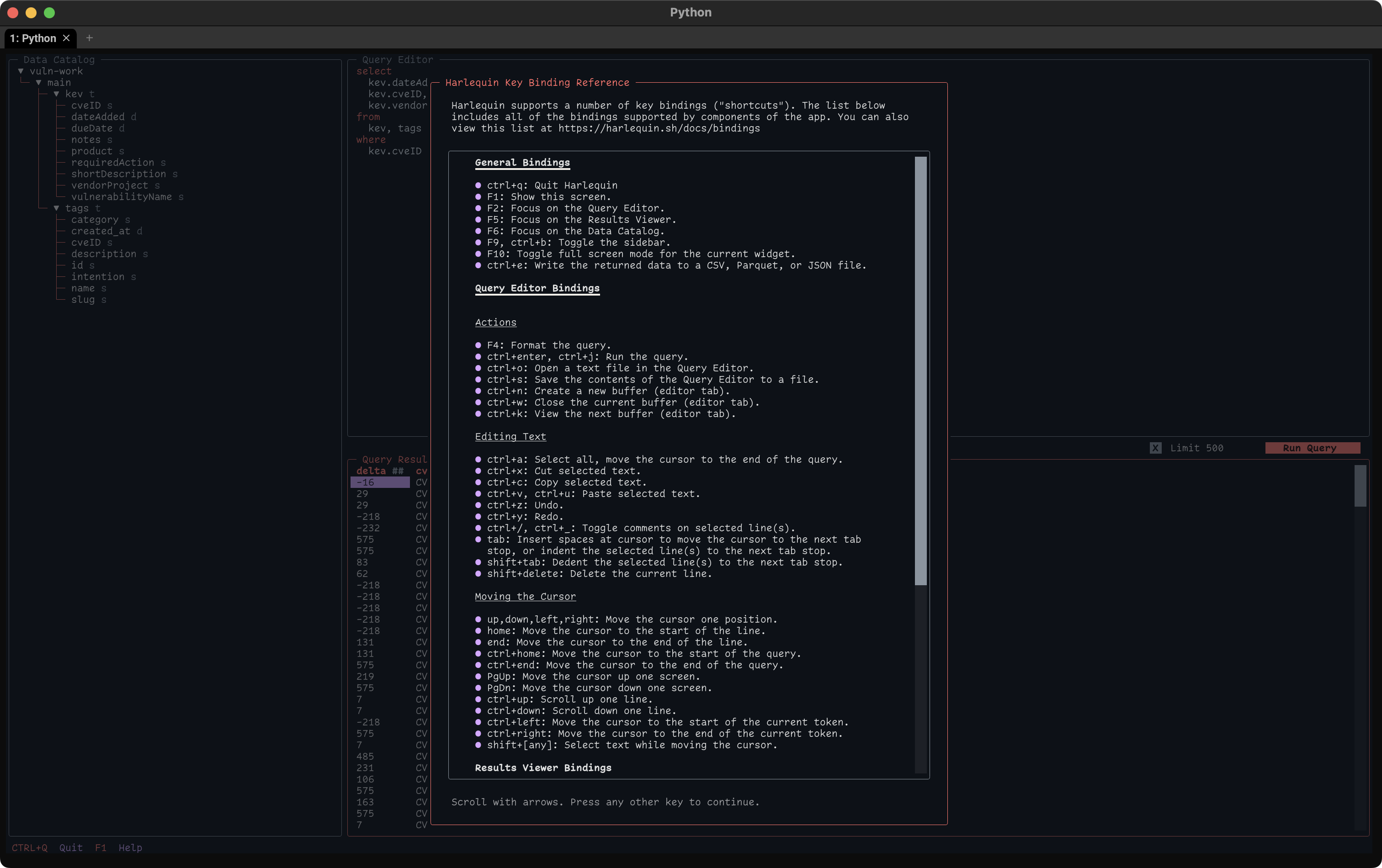
DuckDB is spectacular for data work, but working with DuckDB databases using the CLI can be somewhat limiting, especially when dealing with complex queries and large result sets.
Harlequin (GH) is a new open-source, terminal-based SQL IDE for DuckDB, designed to level-up our interactions with DuckDB databases. It is based on the Textual framework, and can be installed using pip (pipx install harlequin) and run on any shell, terminal, or machine.
Some batteries that come along for the ride include:
a data catalog: view tables, columns, and their types across one or more attached databases
a query editor: a full-featured editor with support for multiple tabbed buffers, allowing you to open, save format, cut, copy, paste, and more
a results viewer & exporter: view up to 10k results in an interactive table, with multiple queries loaded into separate tabs
MotherDuck (see next section) support: connect to any MotherDuck database in local or SaaS mode
full-screen mode: press f10 to view the editor or results in full-screen mode results export: export query results and configure the export using a helpful UI
It supports working with a local DuckDB database file or in-memory tables with full support for DuckDB extensions (i.e., you can start in “memory” and use JSON/CSV/Parquet files over HTTP connection if you like).
The section header is an example of using the interface. These are the queries used to create the vuln-work DuckDB database:
.open 'vuln-work.duckdb';

create table kev as
    select * from read_csv_auto('https://www.cisa.gov/sites/default/files/csv/known_exploited_vulnerabilities.csv');

create table tags as
  select
    cast(m->'$.created_at' as date) as created_at,
    cast(m->'$.id' as varchar) as id,
    cast(m->'$.slug' as varchar) as slug,
    cast(m->'$.name' as varchar) as name,
    cast(m->'$.category' as varchar) as category,
    cast(m->'$.intention' as varchar) as intention,
    cast(m->'$.description' as varchar) as description,
    unnest(m.cves) as cveID
  from (
    select unnest(metadata) AS m from read_json_auto('https://rud.is/data/tags.json')
  );

.exit
and the example query (that’s partially hidden by the help screen) is:
select
  kev.dateAdded - tags.created_at as delta,
  kev.cveID,
  kev.vendorProject
from
  kev, tags
where
  kev.cveID = tags.cveID
if you want to play along at home.
MotherDuck

MotherDuck is a cloud-based service (with support for joining datasets on local systems with datasets on MotherDuck) that provides a managed DuckDB environment. Some of its key features include:
the ability to store and share data securely in the cloud, making it accessible to collaborators
a web-based, interactive SQL IDE
intelligent decision-making on the best place to run a given query, whether it’s on local data or in the cloud
integration with popular tools and frameworks, such as dbt Core, (ugh) Tableau, Metabase, and more.
The section header is a screen capture of Harlequin working with MotherDuck, using one of the sample databases that comes with the service. I fired that up via:
$ harlequin "md:" ~/Data/ddb/vuln-work.duckdbIt will do an auth dance, and provide information back in the terminal to show how to store the authentication token for future sessions.
It’s free, for now, but they have thoughts on the pricing model.
It may be a good place for me to roll up some tiny work Parquet files into more useful/properly-sized ones vs. hit S3 for the analytics work I do on our data. I’ll report back when I get time to try that out.
DuckDB Snippets

The MotherDuck folks have also created a forum to share and vote on useful DuckDB snippets. I could blather more about it but it’s fairly self-explanatory.
The forum is based on Bash One-Liners, a “growing collection of practical and well-explained Bash one-liners, snippets, tips and tricks”.
FIN
Time to get quacking on this fine fall Wednesday! ☮️
 hrbrmstr's Daily Drop
Leave a comment