tldts; Ada; How many IP addresses can a DNS query return?
Bob Parsons (GoDaddy Founder) once said:
“A domain name is your address, your address on the Internet. We all have a physical address; we’re all going to need an address in cyberspace. They’re becoming increasingly important. I believe we’ll get to the point where when you’re born, you’ll be issued a domain name.”
Thankfully, he has (so far) been wrong, but Bluesky’s AT Protocol could help make that “a thing”.
Today we (tangentially) look at two resources to help you deal with domains and subdomains in a URL parsing context, and one domain-related post that will help you think like a hacker.
TL;DR
This is an AI-generated summary of today’s Drop.
I’ll be darned if Perplexity did not do a seriously excellent job today.
tldts: A JavaScript library for extracting hostnames, domains, public suffixes, top-level domains, and subdomains from URLs. It is fast, supports Unicode/IDNA, and is continuously updated. Check it out on npm and GitHub.
Ada: A fast, WHATWG-compliant URL parser written in modern C++ with Rust, Golang, and Python bindings. It provides a command-line interface and a WebAssembly playground. Explore Ada on its website and GitHub.
How many IP addresses can a DNS query return?: A thought-provoking question (answer in link in section) that encourages thinking like a hacker. The answer can be found by referring to RFC 5966 and exploring answers to this question.
tldts

tldts (GH) is a JavaScript library to extract hostnames, domains, public suffixes, top-level domains and subdomains from URLs.
I bounce between some subset of R, JavaScript, Go, Rust, bash/zsh, C, C++ and some more esoteric, and some terrible (ref: python) languages on an almost daily basis. As I lamented on socmed over the weekend, I’ve spent and do spend most of my work hours (and, sadly, play hours) working with Indicators of Compromise. Contained within that label are beasties such as IP addresses, URLs, and domain names.
Depending on what context I’m in, I will 100% likely still need to handle URLs and domains, and — given that I measure internet-scale data — I need to handle them fast.
I saw someone else take note of tldts, and that was enough of a reminder to include it here, today.
It self-boasts that it is:
tuned for performance (order of 0.1 to 1 μs per input)
handles both URLs and hostnames
includes full Unicode/IDNA support
supports parsing email addresses
able to detect IPv4 and IPv6 addresses
continuously updated to ensure it uses the current version of the public suffix list
in full support of typeScript, and ships with umd, esm, cjs bundles and type definitions
tiny
battle tested: full test coverage and production use
For a while now, npm (node package manager; one of the most ubiquitous JS bits of tooling around) comes baked in with npx, a command that will run “main” JS programs in JS packages. It will also download them for you before running (if not installed).
You can test out tldts at a CLI via:
$ npx tldts "https://dailyfinds.hrbrmstr.dev/p/bonus-drop-26-2023-09-24-digging"
Need to install the following packages:
  tldts@6.0.15
Ok to proceed? (y) y
{
  "domain": "hrbrmstr.dev",
  "domainWithoutSuffix": "hrbrmstr",
  "hostname": "dailyfinds.hrbrmstr.dev",
  "isIcann": true,
  "isIp": false,
  "isPrivate": false,
  "publicSuffix": "dev",
  "subdomain": "dailyfinds"
}
(I deliberately did that in a VM w/o the package installed.)
You can also run it in batch mode at the CLI or use it programmatically. This is the full API:
tldts.parse(url | hostname, options)tldts.getHostname(url | hostname, options)tldts.getDomain(url | hostname, options)tldts.getPublicSuffix(url | hostname, options)tldts.getSubdomain(url, | hostname, options)tldts.getDomainWithoutSuffix(url | hostname, options)
If you’re tired of installing things on your system, you can also check it out in-browser via RunKit (that’s the image in the section header).
You can also dig into the comparison and benchmarks provided by the author.
Ada
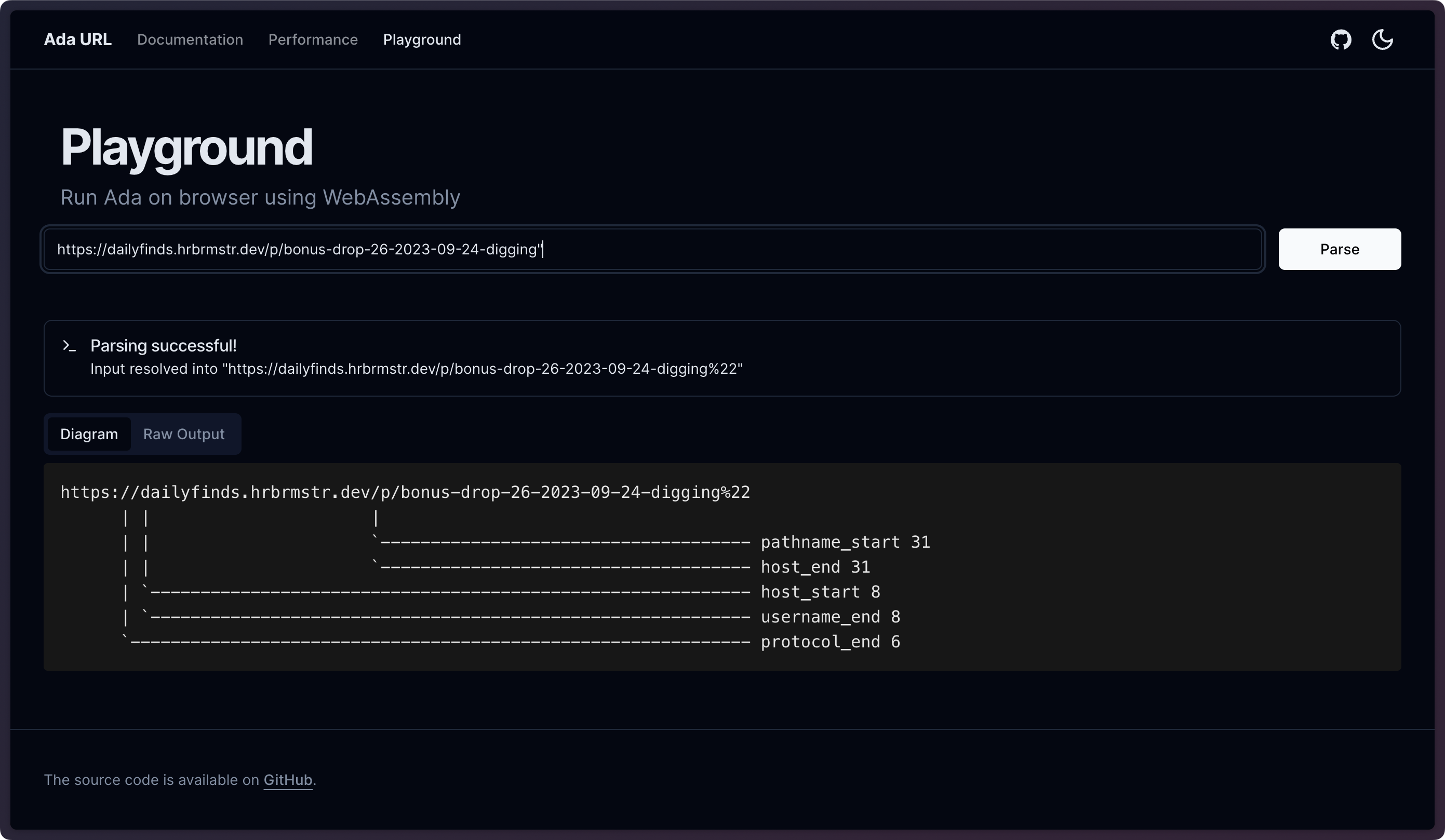
Ada (GH) is WHATWG-compliant and fast URL parser written in modern C++. It’s bonkers fast, which make this hrbrmstr 🤗.
While it is a great library, it’s also a fine CLI:
$ adaparse "https://dailyfinds.hrbrmstr.dev/p/bonus-drop-26-2023-09-24-digging"
{
  "buffer":"https://dailyfinds.hrbrmstr.dev/p/bonus-drop-26-2023-09-24-digging",
  "protocol":"https:",
  "host":"dailyfinds.hrbrmstr.dev",
  "path":"/p/bonus-drop-26-2023-09-24-digging",
  "opaque path":false,
  "protocol_end":6,
  "username_end":8,
  "host_start":8,
  "host_end":31,
  "port":null,
  "pathname_start":31,
  "search_start":null,
  "hash_start":null
}
I especially like the “diagram” output (I used a short URL b/c “Substack code block”):
$ adaparse --diagram "https://rud.is/b/"
https://rud.is/b/ [17 bytes]
      | |     |
      | |     `-- pathname_start 14
      | |     `-- host_end 14
      | `-------- host_start 8
      | `-------- username_end 8
      `---------- protocol_end 6
Again, if you are weary of local installs, you can try it out in a WASM playground
It comes with Rust, Golang, and Python bindings, and David Schoch beat me to an R package for it (and it is much faster than my curlparse package, as expected).
This one is most certainly a keeper.
How many IP addresses can a DNS query return?

The question in the section title is a good one, and is answered quite well, here — BUT DO NOT GO THERE YET!
Said question is also an indication of how hackers think, and it’d be great if more folks thought like hackers vs. take the world (digital or otherwise) at face value.
You very likely seldom lookup a domain name to get an IP address. All that magic happens in browsers and apps for you. You can do so at any command line via dig or nslookup (even on Windows). Use either one of those commands with any domain you come across, and you’ll get one or more IP addresses back (that’s the default mode for most of said tooling).
DNS is bound by certain rules and constraints, and one reason so much (digital) stuff breaks (and is compromised/ransomed) is due to implementers not adhering to checks on these constraints.
I’d like to encourage folks to hit up RFC 5966 and also poke around the answers to this question to see if you can work out the answer on your own (FWIW, all of you are 100% capable of doing that with those two resources).
FIN
As noted on socmed eariler today, “tzom kal” for those observing this week! I’ll refrain from #nom pic posts during this time. ☮️
 hrbrmstr's Daily Drop
Leave a comment