MANual Overdrive; DIY SIEM On A Budget; Cagey 📦
The injured digit is back to about 90% so plenty of life in it for a Bonus Drop this weekend and back to the regular schedule this week. There should be something for everyone, even my cyber mates.
Resources covered:
History of UNIX Man Pages

Not being able to type has been annoying (almost as annoying as me reminding you I haven’t been able to really type). So, I’ve done even more reading than usual, and also some old (old) bookmarks cleaning.
One of those bookmarks was for the History of UNIX Man Page. That link is a tad “just the facts”, so I thought I’d add a (slight) bit of exposition (and, some links to hopefully working versions of older tools). I find it amazing that the “why” for how we view linux, bsd, and macos docs today is similar to why the various components of our crude rocketships are/wre the way they are/were.
Oh, and just a reminder that the glowing rectangle in your pocket is infinitely more powerful than any of the systems mentioned/linked to.
The history of UNIX man pages can be traced back to the 1960s, with the development of the RUNOFF utility by Jerome H. Saltzer for MIT’s IBM 7094 CTSS operating system. This utility was the precursor to the modern man page format, with its section-based layout and two- or three-letter instructions.
In 1969, Douglas McIlroy ported RUNOFF to the GECOS GE-645 computer at AT&T Bell Labs, Murray Hill, in a version called runoff or roff. This port was influential in the development of UNIX man pages. In 1971, Dennis Ritchie incorporated Multics runoff as UNIX roff(1) in Version 1 AT&T UNIX, a PDP-11 assembly-language port of the BCPL runoff. This version introduced the First Edition UNIX Programmer’s Manual, which defined the man page structure and layout still used today.
Joseph F. Ossanna took over the PDP-11 roff(1) and built nroff(1) for Version 2 AT&T UNIX in 1972, focusing on outputting text onto terminals and introducing the notion of programmable macros. In 1973, Ossanna started writing troff(1) from his PDP-11 nroff(1) sources for Version 4 AT&T UNIX, which was the first version to use a macro set for writing manual pages.
Between Version 4 AT&T UNIX (Nov. 1973) and Version 6 AT&T UNIX (May 1975), a simple macro set was used for writing manual pages, but these macros were incompatible with the macro sets used today. In 1979, Joseph F. Ossanna and Brian Kernighan developed ditroff(1), which improved upon troff(1) by generating “device-independent” output for devices whose properties were specified in dynamically loaded files.
While history is all well and good, perhaps you want to dig into the current man page ecosystem. If so, there’s a:
Come to think of it, making a man page might be a good WPE this week.
SIEM On The Cheap Via SQLite

A non-insignificant part of my $DAYJOB is looking for new cyber resources that pop up in any given week. One such resource which crosses the “data dabbler”, “data science”, and “cyber” streams was this post on “A SIEM On the Cheap – Using Sqlite for Data Analysis”.
It’s short, so I won’t ruin it by just reproducing it here.
What I will do is note that lots of cyber vendor and responder blogs/posts info out there assume you have millions of dollars, a giant AWS infrastructure, and petabytes of data. So, lots of those blogs aren’t very helpful to the 80-90% of defenders who aren’t in that type of bind.
This post does a great job showing folks how to use the analytics powers of SQL (via SQLite) to solve real world (small-ish data) cyber problems.
It also kind of makes me want to write a mini-book on using DuckDB for bits like this.
Suspicious Package(s)
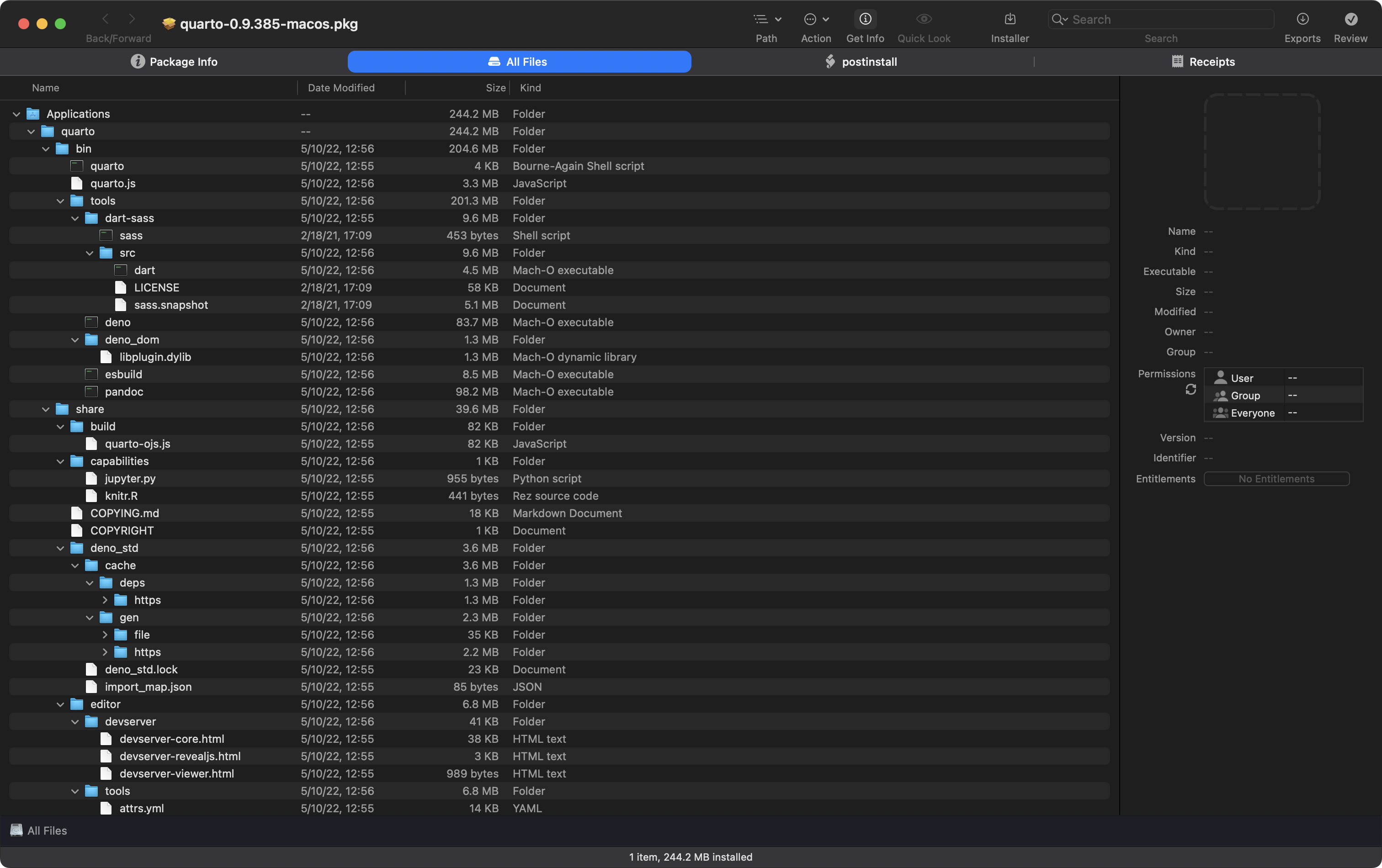
This one is 100% for macOS folks, but it might be interesting if you have to help macOS mates or do forensics in macOS environments.
macOS users tend to install things in one of three ways:
use the macOS Mac App store (which almost nobody does)
download DMG (disk images, kind of like ISOs) files and drag apps to
/Applicationsdouble-click on
.pkgfiles
That third item is like doing sudo apt install or sudo gdebi to get a bundle extracted on to your filesystem.
Packages have files that are copied and scripts that are run, often with elevated privileges. Both can be, to put it bluntly, dangerous.
While we never really should have trusted anyone when it comes to blindly installing stuff on our systems, we really should not do that in this day and age.
Enter: Suspicious Package, a macOS app that lets you get all up into any 📦’s business by looking it at it from every angle.
The section header shows the filesystem layout portion.
This utility lets you check out what the setup and post-install scripts might do to you, and also see what is being done to your filesystem at a very granular level.
I look at any first-time-package-install with this utility, and will typically do random checks on things I kind of trust (like the Quarto package in the section header).
The app’s page has tons of info and a handy FAQ, so you can learn as many details as you like, but I’d 100% suggest using this in the same way I do to help make your macOS use a bit safer.
It is usually updated about this time every year (macOS operating system updates usually require such tweaking for many utilities), but Sonoma seems to have left Suspicious Package unscathed this time round.
FIN
I hope any U.S. east coast readers are doing fine after yet-another storm, and I trust Southern Hemisphere readers are enjoying the onset of Spring! ☮
 hrbrmstr's Daily Drop
Leave a comment