polars-cli; SQLPage; Stepping Into The LZone
I had not intended to make today’s Drop a “SQL” edition, but I came across the first resource yesterday, and it’s super cool, so “best laid plans…” and all that.
TL;DR
This is an AI-generated summary of today’s Drop.
Perplexity is still my fav assistant, and supports file uploads, so I defaulted to it today — choosing the “writing” focus — with a prompt that I’ve been working on “perfecting” since I started this “TL;DR” exercise: “The attached file contains a blog post in Markdown format with three main sections of content. I would like a very concise three bullet summary of it. Each bullet should succinctly describe a section and include the link to the primary resource being covered.”
Despite having numerous links throughout the document, and starting the first section with a completely different link, it did phenom job. 0 edits required.
polars-cli: A new CLI tool that provides a dataframe interface on top of an OLAP query engine implemented in Rust using Apache Arrow Columnar Format as the memory model. It serves as an alternative to DuckDB for data wrangling. Link to polars-cli
SQLPage: A Rust-based SQL-only website builder that uses Handlebars templates for rendering and supports SQLite, PostgreSQL, MySQL, and Microsoft SQL Server. It offers various components for building web applications with dynamic data. Link to SQLPage
The LZone: A website by Lars Windolf that offers a wide array of cheat sheets, including SQL-oriented cheat sheets for various SQL environment contexts. Link to The LZone
Oddly enough, though, it — once again — coughed up some information it probably shouldn’t have:
Citations:
[1] https://ppl-ai-file-upload.s3.amazonaws.com/web/direct-files/4298/cc96e9b9-5488-4439-b4bc-de2b7569b826/index.md
polars-cli

Polars is a dataframe interface on top of an OLAP query engine implemented in Rust using
Apache Arrow Columnar Format as the memory model.
Polars-cli is a nigh two-week old nascent CLI wrapper for Polar’s functionality. Think of it as an alternative to duckdb.
To use it, you have to do the
$ cargo +nightly install --locked polars-clidance, since binaries are not yet available, and it is also not presently in any package managers.
Let’s kick the tyres a bit!
We’ll assume the following is in a QUERY environment variable:
SELECT
  name,
  alignment
FROM
  read_parquet('superheroes.parquet')
WHERE
  (height_in > 0) AND
  (height_in < 50)
Note that there are corresponding:
read_ipc('…')read_csv('…')read_json('…')
functions for those file types.
$ echo "${QUERY}" | polarsis equivalent to:
$ polars -c "${QUERY}"The environment variable POLARS_FMT_TABLE_FORMATTING controls table output formatting. By default, polars will print a familiar Polars table output:
┌─────────────────┬───────────┐
│ name            ┆ alignment │
│ ---             ┆ ---       │
│ str             ┆ str       │
╞═════════════════╪═══════════╡
│ Dash            ┆ good      │
│ Howard the Duck ┆ good      │
│ Jack-Jack       ┆ good      │
│ Krypto          ┆ good      │
│ Rocket Raccoon  ┆ good      │
│ Yoda            ┆ good      │
└─────────────────┴───────────┘
You can also ensure the above is the output type with -o table.
If you change the value to ASCII_MARKDOWN — or use -o markdown — you’ll get:
| name            | alignment |
| ---             | ---       |
| str             | str       |
|-----------------|-----------|
| Dash            | good      |
| Howard the Duck | good      |
| Jack-Jack       | good      |
| Krypto          | good      |
| Rocket Raccoon  | good      |
| Yoda            | good      |
Setting:
POLARS_FMT_TABLE_HIDE_COLUMN_NAMESto1will hide column namesPOLARS_FMT_TABLE_HIDE_COLUMN_DATA_TYPESto1will hide column data typesPOLARS_FMT_STR_LENcontrols the maximum width of a string in table or Markdown format (default is80in the interactive shell)POLARS_FMT_MAX_ROWScontrols how many rows are returnedPOLARS_VERBOSEto1will display some debugging info aspolarsdoes its thing
The tool has a predictable set of other output options:
# IPC Arrow
$ polars -o arrow -c "${QUERY}" > newdb.arrow

# prove ^^ works with
$ Rscript -e 'arrow::read_ipc_file("newdb.arrow")'

$ polars -o csv -c "${QUERY}"

$ polars -o json -c "${QUERY}"

$ polars -o parquet -c "${QUERY}" > newdb.parquet

# prove ^^ works with:
$ Rscript -e 'arrow::read_parquet("newdb.parquet")'
Because it is using ctx.execute(query) and a call to collect(), polars should be able to handle large datasets.
The interactive shell is very basic, and I haven’t played with the “state saving/loading” bits yet.
It’s nice having a DuckDB alternative data wrangling tool written in Rust (DuckDB is coded in C++). However, DuckDB is a bit more full-featured for my use cases. Nonetheless, I’ll be keeping an eye on this new CLI tool, and it’ll def be a default install on any data-centric setups.
Grab superheroes.parquet if you want to replicate the above examples.
SQLPage
This one goes into the “did not think it would be useful at first glance” category, since that was 100% my initial thought when I came across SQLPage (GH) the other day.
The project describes itself as a “SQL-only website builder”. I’d call it a SQL-coded web application server that relies heavily on Handlebars templates for rendering.
It’s written in Rust, is an A+++ solid showcase of what the Actix crate can do, and ships as a single binary. After downloading and extracting it, macOS folk will have to:
$ mv sqlpage.bin "${HOME}/bin/sqlpage"
$ xattr -d com.apple.quarantine "${HOME}/bin/sqlpage"
or codesign it with your own certs to avoid the Potemkin village that is macOS’ Gatekeeper security theatre.
You build websites in a directory structure like this:
website
├── b
│   └── index.sql
├── index.sql
└── sqlpage
    ├── data
    │   └── superheroes.sqlite
    ├── migrations
    └── sqlpage.json
WARNING: The
sqlpage/directory is NOT protected by the web app server.If someone hunts for or knows the path to any file in there — such as https://sql.ophir.dev/sqlpage/sqlpage.json, the SQLPage server will send it to them. You should 100% front this with a well-configured reverse proxy server.
The sqlpage.json file controls some basic configuration info, including database connection string, other database options, and server binding info. By default, it binds to 0.0.0.0:8080 so you should immediately set listen_on to bind to localhost during development.
Mebbe keep it that way in prod, too, and ensure you use that well-configured reverse proxy.
This is the minimal config I used to kick the tyres:
{
  "database_url": "sqlite://sqlpage/data/superheroes.sqlite",
  "listen_on": "localhost:8080"
}
You can also use two environment variables to control some things:
DATABASE_URL="sqlite:///path/to/my_database.db?mode=rwc"
SQLITE_EXTENSIONS="mod_spatialite crypto define regexp"
SQLPage supports:
a SQLite file with
sqlite://your-database-file.db(can be:memory:if you’re building it all on the fly),a PostgreSQL-compatible server with
postgres://user:password@host/databasea MySQL-compatible server with
mysql://user:password@host/databasea Microsoft SQL Server with
mssql://user:password@host/database
The server renders .sql files as webpages, and any of those files are directly linkable with or without the .sql extension. Query parameters are supported, and the values can be used in any SQL context.
The sqlpage/migrations folder is for SQL scripts that are executed on startup. Each script represents a migration that sets up or modifies the database structure. The scripts are executed in alphabetical order, so you can prefix them with a number to control the order in which they are executed. If you don’t want SQLPage to manage your database schema, you can ignore the sqlpage/migrations folder completely, and manually create and update database tables using your own favorite tools.
It ships with support for a bonkers number of pretty useful components, and the GH repo has many examples to riff from.
The mental model of the authors sinks in after playing with the framework for a bit.
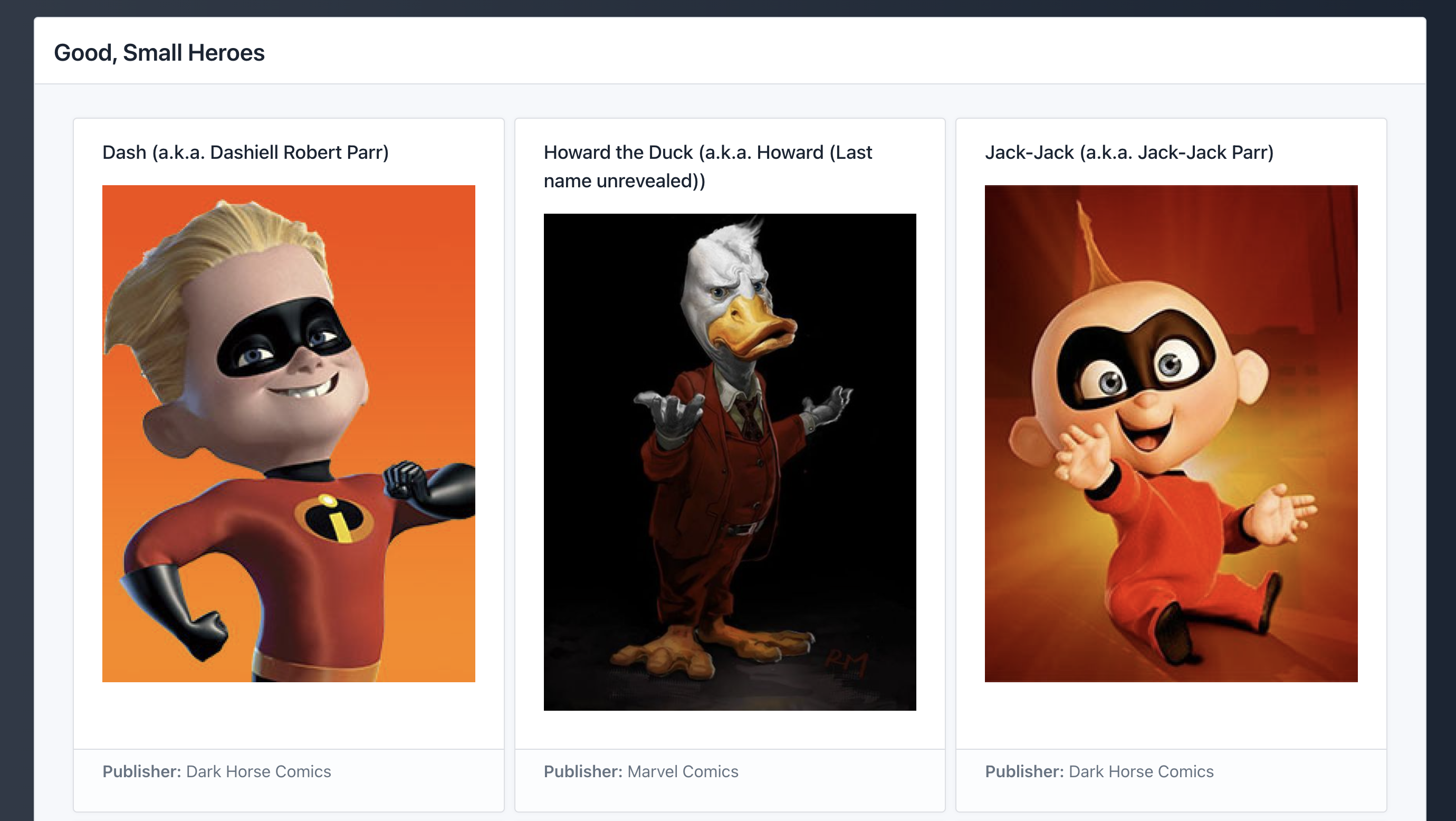
The main index.sql contains the following SQL:
SELECT 'shell' AS component, 'Good, Small Heroes' AS title;
SELECT 'card' AS component;
SELECT
name || ' (a.k.a. ' || full_name || ')' AS title,
'' AS description_md,
'**Publisher:** ' || publisher AS footer_md
FROM
superheroes
WHERE
alignment = 'good' AND
height_in > 0 AND
height_in < 50 AND
image_url != '';(Yes, I’m old enough to be stuck in ALL CAPS mode for SQL keywords. SHOUTY SQL is the bestest SQL.)
The first SELECT sets up an overarching container that’s being used and sets a title on it.
The next SELECT says we’re using a card layout, which is a grid where each element is a small card that displays a piece of data. That link has all the per-card options.
The next SELECT is operating in the context of that card container, and setting values to parameters supported by the card component will populate the grid. In this case, we’re setting a name (|| is ANSI SQL infix concatenation; this could be confusing if you’ve only ever used MySQL/MariaDB or MS SQL Server), displaying an image, and noting the publisher in the card footer.
You’ll see the result of that in the section header.
There’s full support for
user input via form elements
intricate layouts with tabs, tables, lists, geo-maps, and more
user-directed CSV data downloads
creating an API over SQL calls via the JSON component
and creating+registering custom components that you define in Handlebars syntax.
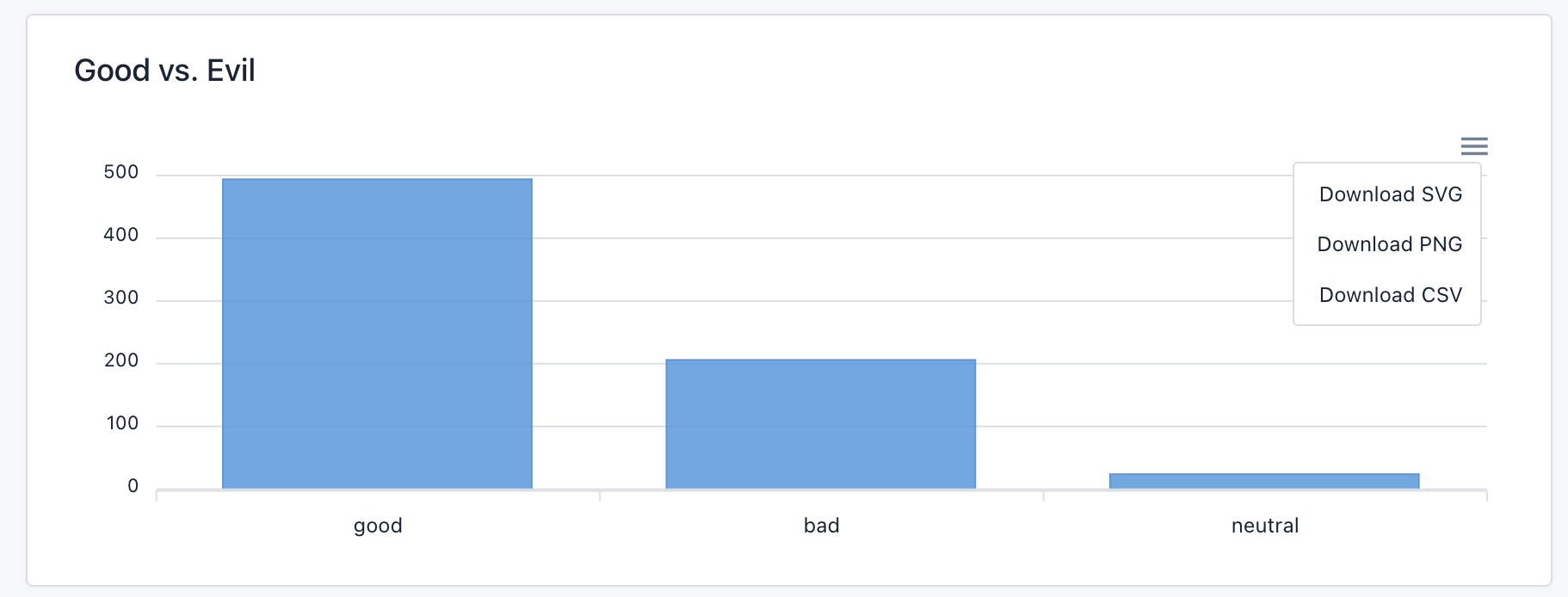
It even ships with a chart component that’s based on Apex Charts. The b/index.js looks like this:
SELECT
  'chart' AS component,
  'Good vs. Evil' AS title,
  'bar' AS type,
  1 AS toolbar;

SELECT
  alignment AS x,
  ct AS value
FROM
  (SELECT
    alignment,
    count(*) AS ct
  FROM
    superheroes
  GROUP BY
    alignment)
ORDER BY
  ct DESC
and the result is what you would expect:
There’s a “Corporate Conundrum” example site/board game 100% built with only SQLPage that showcases pretty much everything it can do. The main site is also 100% SQLPage, as is the blog.
With a tad bit more attention paid to “security”, this could be a nice, quick method of making information available to folks and/or building entire sites with dynamic data.
Grab superheroes.sqlite if you want to re-create the above.
Stepping Into The LZone

The first two sections were pretty deep dives, so we’ll close with something lightweight but still useful and SQL related.
The LZone is a site by Lars Windolf that has, amongst other things, a wide array of cheat sheets.
As I noted the other day, thanks to long covid, I have a new affinity for these beasties. If you head over there, tap the search area, and start typing S Q L, you’ll see some useful SQL-oriented cheat sheets for various SQL environment contexts.
FIN
Perhaps we’ll give SQLPage a bit more of a workout in Friday’s WPE. ☮
 hrbrmstr's Daily Drop
Leave a comment