⚡️ Fast Rust-Based Index/Search Framework, CLI & Server + WPE Extra Credit
If you’ve taken up the challenge of this week’s WPE, it’d be 🤙🏼 if you could, y’know, actually use that data you’ve worked hard to create from all those podcasts. If not, then you very likely have some need to quickly find other types of information you’ve crafted or curated.
So, today we’ll dig a bit into a bonkers cool Rust-based framework (crate), CLI tool, and minimal server implementation that makes searching through scads of “documents” quick, easy, and local.
For good measure, I’ll also give you a starter Vite + Lit + Spectre CSS vanilla JS project to work with this super cool search engine and use Friday’s “podcast” WPE as part of the example.
Here’s what we’re covering today:
A starter web app to search your podcast transcripts
Tantivy Framework (Crate), CLI, And Server

Tantivy is a full-text search engine library written in Rust, inspired by Apache Lucene. It handles indexing and searching of large datasets efficiently while maintaining high performance. Tantivy itself is not an off-the-shelf search engine server like Elasticsearch or Apache Solr, but rather a crate that can be used to build such a search engine.
The core project README has an extensive list of features. Some key ones include:
full-text search (obvsly)
a configurable tokenizer, with stemming available for 17 Latin languages, and lots of third-party add-ons
BM25 scoring (more on that in a bit)
a familiar natural query language (e.g.,
(naomi AND holden) OR "rocinante")phrase queries search (e.g.,
"amos burton)incremental indexing
multithreaded indexing (indexing the entirety of English Wikipedia takes < 3 minutes)
Text,i64,u64,f64, full RFC3339dates,ip,bool, and hierarchical facet fieldsJSON field support
aggregation collector, supporting: histogram, range buckets, average, and stats metrics
While Tantivy itself has no moving parts, the overarching project has a reference implementation that we’ll use to help index and search text from the podcast transcripts WPE mission (which can be adapted to other contexts).
At the end, I’ll drop some links to other projects that use Tantivy, including some far more robust search tools you should use instead of the reference CLI + server (if you intend to use this in “production”).
How Tantivy Works

Tantivy uses a schema to define the fields in the index, their types, and how they should be indexed. So, to create an index, you first need to define a schema and add fields to it. The best way to grok this is to use the Tantivy CLI, which you can do via:
$ cargo install tantivy-cliCreate a new directory, say, pod-tan (I am not very creative), cd into it, then:
$ tantivy new -i .It’ll walk you through various questions asking if you just want to index or just include a field, the field type, and some extra indexing options, such as this partial example:
Creating new index
First define its schema!

New field name? title
Choose Field Type (Text/u64/i64/f64/Date/Facet/Bytes) ? Text
Should the field be stored (Y/N) ? Y
Should the field be indexed (Y/N) ? Y
Should the term be tokenized? (Y/N) ? Y
Should the term frequencies (per doc) be in the index (Y/N) ? Y
Should the term positions (per doc) be in the index (Y/N) ? Y
Add another field (Y/N) ? Y
Substack isn’t great for displaying JSON, but here’s the full schema for the podcast index/search (ignore index_settings, segments, and opstamp; they’re internally managed):
{
  "index_settings": {},
  "segments": [],
  "schema": [
    {
      "name": "show",
      "type": "text",
      "options": {
        "indexing": {
          "record": "basic",
          "fieldnorms": true,
          "tokenizer": "raw"
        },
        "stored": true,
        "fast": false
      }
    },
    {
      "name": "episode",
      "type": "text",
      "options": {
        "indexing": {
          "record": "position",
          "fieldnorms": true,
          "tokenizer": "en_stem"
        },
        "stored": true,
        "fast": true
      }
    },
    {
      "name": "id",
      "type": "text",
      "options": {
        "stored": true,
        "fast": false
      }
    },
    {
      "name": "from",
      "type": "text",
      "options": {
        "stored": true,
        "fast": false
      }
    },
    {
      "name": "to",
      "type": "text",
      "options": {
        "stored": true,
        "fast": false
      }
    },
    {
      "name": "duration",
      "type": "text",
      "options": {
        "stored": true,
        "fast": false
      }
    },
    {
      "name": "description",
      "type": "text",
      "options": {
        "stored": true,
        "fast": false
      }
    },
    {
      "name": "text",
      "type": "text",
      "options": {
        "indexing": {
          "record": "position",
          "fieldnorms": true,
          "tokenizer": "en_stem"
        },
        "stored": true,
        "fast": true
      }
    },
    {
      "name": "pubDate",
      "type": "date",
      "options": {
        "indexed": false,
        "fieldnorms": false,
        "fast": "single",
        "stored": true,
        "precision": "seconds"
      }
    },
    {
      "name": "link",
      "type": "text",
      "options": {
        "stored": true,
        "fast": false
      }
    }
  ],
  "opstamp": 0
}
NOTE: I find it helpful to keep a copy of the schema after first creating it, so you can re-use it when iterating (and avoid having to use the CLI helper).
We’ll dig into the CLI/server in a dedicated section. For now, we’ll finish up the look at Tantivy core.
When adding documents to the index, Tantivy creates multiple small indexes called segments. These segments are created to handle indexing documents that do not fit in memory. The process of creating segments involves splitting the input file into smaller chunks, sorting the different parts, and then merging them into a final index. It relies heavily on three fundamental data structures:
an inverted index: This is the primary data structure used by Tantivy for indexing and searching. The index is organized by terms (words), and each term points to a list of documents/records. This allows for efficient search operations, as it maps terms to their locations in a document or a set of documents, rather than searching through all the documents.
finite state transducers (FST): Tantivy uses FSTs for its term dictionary, which allows for efficient storage and retrieval of terms in a sorted manner. FSTs are popular data structures for search engine term dictionaries due to their compactness and performance characteristics. They read from one of the “tapes” (usually called an “input tape”) and write onto the other “output tape”. FSTs are often used for phonological and morphological analysis in natural language processing research and applications. (I added that last sentence just to be able to use those $10 words).
skip lists: Tantivy employs skip lists to improve search performance, particularly for simple boolean queries. This probabilistic data structure allows for faster traversal of the inverted index during search operations. In it, elements are organized in “layers”, with each layer having a smaller number of elements than the one below it. The bottom layer is a regular ol’ linked list, while the layers above it contain “skipping” links that allow for fast navigation to elements that are far apart in the bottom layer.
Tap those links to get additional information and some visual aids.
The need for a schema makes it somewhat less useful (out-of-the box, at least) than, say, Solr — which can create schemas on the fly. There’s nothing stopping you from writing a small tool to auto-gen a schema from a document, but you will still have to make decisions about whether to index or just include fields, and the performance details.
BM25
Since most of us aren’t Google, Kagi, Solr, Elasticsearch, or Lucene engineers, some folks may not be familiar with the more esoteric terms in this space. We’ll dig into the final, likely odd, term, now.
BM25 is a term-based ranking model used in information retrieval systems to estimate the relevance of documents to a given search query. It is an extension of the TF-IDF (Term Frequency-Inverse Document Frequency) approach, incorporating additional factors such as document length and term saturation.
The main idea behind BM25 is to score documents based on their term frequencies and document lengths. It calculates a relevance score for documents based on the frequency of query terms appearing in each document, regardless of their proximity within the document. This allows for efficient search operations, as it maps terms to their locations in a document or a set of documents, rather than searching through all the documents.
BM25 also includes a term saturation function to mitigate the impact of excessively high term frequencies. This function reduces the effect of extremely high term frequencies on relevance scoring, as very high frequencies often correspond to less informative terms.
Elastic has a solid blog post series on this topic.
ENOUGH THEORY! Tis time to put this tech to use!
Tantivy CLI
You should follow the basic example in the Tantivy CLI repo before continuing.
We already saw the schema for the podcast index we’ll be making/using. I used the CLI helper to make it, but ended up adding a field or two manually. I chose these fields:
showepisodeidfromtodurationdescriptiontextpubDatelink
mostly to include something besides just Text, and because this index is being tailor made for a web app. Here’s what that app looks like:

The text and description fields get extra 💙 by having the most robust indexing support.
I used the JSON files generated by Whisper.cpp to make one “big” JSON file with 1,551,771 “documents”. One document is, essentially, a single VTT transcript line. Keen-eyed readers should feel free to chastise me for being lazy and adding in so much redundant data to each record. I wanted to keep the (already kind of large) web app as simple as possible, so I wastefully added the description and other episode metadata to each record.
Each record in the resultant, giant JSON doc looks like this:
{
  "show": "Knowledgefight",
  "episode": "#164: May 25, 2018",
  "id": "05-25-18:1",
  "from": "00:01:00,000",
  "to": "00:01:05,040",
  "duration": "01:59:04",
  "description": "<p>Today, Dan tells…",
  "text": " The most messages …",
  "pubDate": "2018-05-28T01:37:22Z",
  "link": "https://traffic.libsyn.c…"
}
After doing:
cat kf.json | tantivy index -i .I am wicked lazy when it comes to naming things
Tantivy CLI gave me some indexing status updates:
180153 Docs
648513216 docs / hour 121.65 Mb/s
351777 Docs
617842688 docs / hour 114.45 Mb/s
527062 Docs
631020288 docs / hour 115.13 Mb/s
702378 Docs
631136960 docs / hour 115.97 Mb/s
879483 Docs
637572224 docs / hour 121.60 Mb/s
1052145 Docs
621580736 docs / hour 115.75 Mb/s
1166878 Docs
413034240 docs / hour 77.52 Mb/s
1342089 Docs
630758976 docs / hour 116.65 Mb/s
1517474 Docs
631376512 docs / hour 116.38 Mb/s
Commit succeed, docstamp at 1551777
Waiting for merging threads
Terminated successfully!
TL;DR: It took ~15s to index everything.
We can test it out at the CLI:
$ tantivy search --index . --query 'text:insurrection OR sedition' | jq -r '.text[0]' | head -10
 sedition.
 suing me saying that I said George Soros cause should b…
 To be an armed resurrection or revolution in insurrection.
 to the insurrection act.…
 And so they want to …thing in civil war and civil insurrection,
 They're the ones who are causing all of this insurrection.
 talking about are sedition against America …
 This is the section of the us code on treason and sedition
 and be ready to even quell any type of insurrection
 It involved an insurrection from within Spanish territory,
Or, make it easier to page through the results in with gum (I’m covering Gum this week).
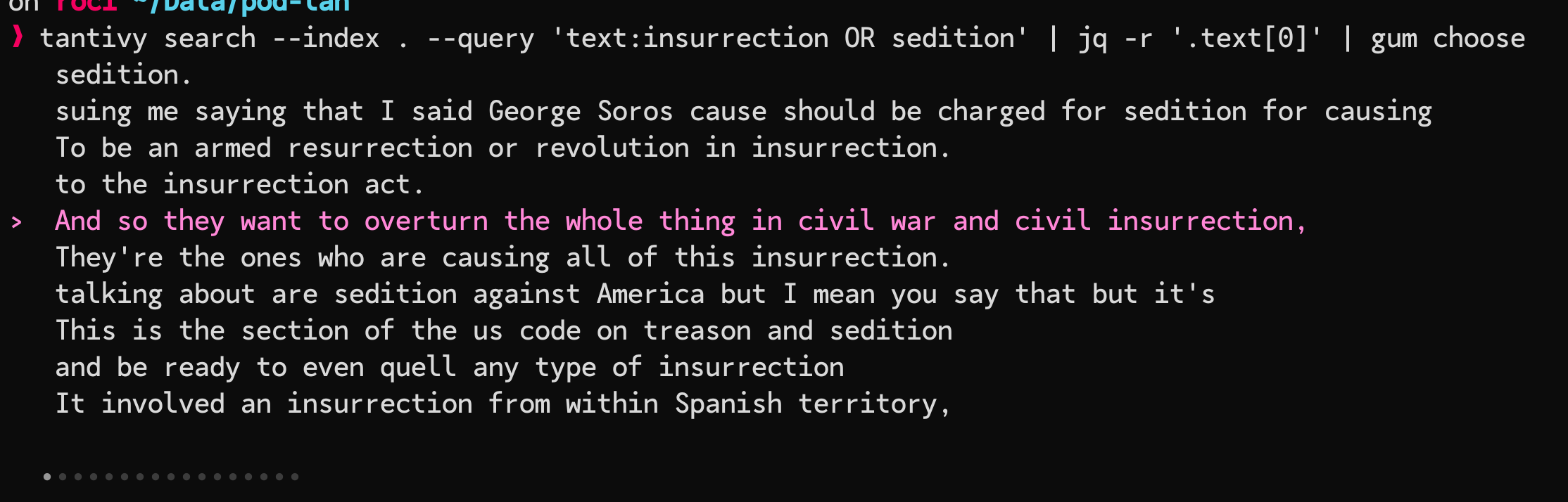
Put some aliases/shell function/script wrappers on that puppy, and you can search away at the CLI with no need for a fancy server.
Tantivy Server
I will be super frank and say that you should consider using the server only as a toy to play with. Don’t get me wrong, it works! But, the makers of Tantivy have an honest-to-goodness EPIC Elastic/Solar alternative that we’ll cover in some other Drop. We already have enough moving parts the way it is, and since the CLI ships with a server, we might as well make use of it.
You’ll want to run a wrapper script around it, since it does not handle errors nicely:
#!/bin/bash

while true; do
  tantivy serve -i .
  exit_status=$?
  if [ $exit_status -eq 0 ]; then
    break
  fi
  sleep 1
done
I named that
svr. Be a better human than me.
All the script does is restart the server when it breaks. Startup time is sub-second, so it’s not a big deal for this exercise.
We can test it out at the CLI via curl:
$ curl -s "http://localhost:3000/api/?q=text:insurrection+OR+sedition&nhits=1"
{
  "q": "text:insurrection OR sedition",
  "num_hits": 162,
  "hits": [
    {
      "score": 17.824883,
      "doc": {
        "duration": ["01:44:00"],
        "episode": ["#89: December 31, 2015"],
  …
 }
The q query parameter is the search query, and I added nhits just to avoid polluting my terminal for this example. You’ll note that the API tells you how many total docs/records it found.
Next up, we’ll talk a bit about the web app.
Pod Search Web App
We saw a screenshot of the app, above. The core functionality exposed includes:
a search box to enter Tantivy queries
a display area for the transcript entries it found (limited to 10 since this is just an example app you can build on)
“more info” button on each entry that will display show metadata, and let us play the episode at the timecode of the associated transcript entry.
The tech stack we’re using is:
Vite for building and running the Node.js project
Spectre CSS since it has just enough bits we need and is lightweight and mostly grokable (CSS frameworks tend to confuse me a bit)
Lit so we can use WebComponents to make it easier to partition out app work
d3-formatb/c I can remember it’sformatfunction name and know how to wield it well. It’s overkill for this project since I’m solely using it to add,to numbers. Be less lazy than me.
The project is not massive:
tree --gitignore
.
├── index.html
├── package.json
├── src
│   ├── environ.js        # URL helpers
│   ├── main.js           # core functions & on-load handler
│   ├── search-box.js     # Search box Lit element
│   ├── search-result.js  # Search result entry Lit element
│   ├── search-results.js # Search results list Lit element
│   └── show-info.js      # Show info (modal) Lit element
└── vite.config.js        # needed for api proxy config
I didn’t poke heavily, but it does not appear that the Tantivy server is CORS-aware. That means poking at it from our app won’t actually work without the introduction of a CORS proxy. For a “real” project, you would never hit Tantivy server, Elastic server, Solr server, etc. directly. EVER! You’d stick a REST API and caching layer in front of it for increased safety and performance. We don’t need to add those moving parts, today.
So, to keep this simple, we’re using a clever part of Vite that lets it act like a CORS proxy for us. Here’s what’s in vite.config.js:
import { defineConfig } from 'vite'

export default defineConfig({
  server: {
    proxy: {
      '/api/': {
        target: 'http://localhost:3000',
        changeOrigin: true
      }
    }
  }
})
Now, we can just make a request to the host:port Vite is running on, and it’ll proxy it to Tantivy for us for free. You can also use local-cors-proxy to achieve the same thing in a standalone manner.
The environ.js file has a helper function to let our app figure out the Vite server/port:
export function getPrefix() {
  if (import.meta.env.DEV) {
    const baseURL = import.meta.env.BASE_URL;
    const scheme = window.location.protocol;
    const host = window.location.hostname;
    const port = window.location.port;
    return `${scheme}//${host}:${port}${baseURL}`;
  } else {
    // use this if you're deploying to production
    // and return another CORS proxy prefix
    return ""
  }
}
Since we’re using WebComponents via Lit, the body of the core index.html is pretty small:
<body>
  <h1 style="text-align:center;padding-top:5% ">Pod Search</h1>
  <div class="container">
    <search-box></search-box>
    <search-results></search-results>
  </div>
  <show-info></show-info>
</body>
Note my lazy inline
stylefor theh1tag. Be a better human than I am.
My example query explicitly tells Tantivy to search the text field:
text:"proud boys" OR "oath keepers" OR "roger stone"You can omit text:, and it’ll search all searchable fields.
In theory, if you’ve created compatible structures and have Tantivy set up the same way, then you can head over to https://gitlab.com/hrbrmstr/podsrch, clone the repo, then
$ npm i
$ npm run dev
and hit the app on the port Vite tells you it’s running on.
Please consider using GitLab issues for questions/clarifications/bug reports.
Have fun stormingsearching the 🏰!
FIN
I reckon this makes up for a missing Bonus Drop (or two). Thanks, once more, for your support! ☮
 hrbrmstr's Daily Drop
Leave a comment