Pseudonymous Git; Pro-choose; Time Lapsce
Good day, Bonus Drop subscribers!
Today, we cast aside the fancy charts, graphs, and bits of JavaScript from the previous week and get back to basics. That’s right, it’s CLI time,! We’ll cover a collection of aliases that will let you impress your friends with your newfound git prowess; give you a better way to get at fields in text streams at the command line; and, put a new-ish editor on your radar.
You’ll be getting another issue a bit later today to finally make up for the missed one a few weeks ago.
Once again, many thanks for your support!
Pseudonymous Git

Generally speaking, both my personal and $WORK git needs are pretty simple. Unless I’ve managed to get a repo into some horrible state, I rarely stray from a tiny fraction of git [sub]commands. I’m fairly certain this would not be the case if I interacted more with the production monorepo at work, but that’s one reason I run a research team and not a few production squads.
However, one does not need complexity to benefit from some bespoke git helpers that can optimize keystrokes, reduce cognitive load for infrequent-but-gnarly git ops, and provide some new functionality you didn’t even know you needed.
GitAlias (GH) is a site and repo that will level up your git work regardless of your current level of git mastery. That’s a pretty bold statement to make, so let me back it up with some examples.
To play along at home, just install the aliases (it’s a super quick and easily undone process) and keep 👀.
NOTE: many of these aliases rely on some particular awk behaviour, so I highly suggest reviewing the help section on awk to ensure you can make the most of these shortcuts and enhancements.
Right off the bat, you’re going to start saving keystrokes for super-common git ops you likely perform every day:
git a=addgit aa=add –allgit b=branchgit cm=commit –messagegit co=checkoutgit l=loggit m=mergegit pf=pull –ff-onlygit pr=pull –rebasegit rrs=remote show
Now, you may have already set up similar aliases, but there are over 30 contributors to GitAlias, and swapping your similar ones out for these that are maintained by a collective means less work on your end to maintain your aliases.
One of my fav commands is git summary, which I ran on my {ggalt} R package repo (which I recently updated thanks to a nod 🙏🏽 from a subscriber and member of the R community):
Summary of this branch...
master
2015-09-08T16:22:00-04:00 first commit timestamp
2023-04-28T09:57:27-04:00 last commit timestamp

Summary of counts...
133 commit count
50 date count
2 tag count
15 author count
15 committer count
1 local branch count
3 remote branch count

Summary of this directory...
/Users/hrbrmstr/packages/ggalt
120 file count via git ls-files
175 file count via find command
63880 disk usage

Most-active authors, with commit count and %...
66 49% bob@rudis.net
43 32% bob@rud.is
7 5% tarcisio.fedrizzi@gmail.com
4 3% yonicd@gmail.com
2 1% brudis@rapid7.com
2 1% bbolker@gmail.com
1 0% yonis@metrumrg.com

Most-active dates, with commit count and %...
19 14% 2017-11-28
11 8% 2016-03-20
7 5% 2015-09-08
6 4% 2017-02-14
5 3% 2017-02-12
5 3% 2016-04-09
5 3% 2016-01-04

Most-active files, with churn count
55 DESCRIPTION
46 README.md
40 README.Rmd
36 NAMESPACE
21 man/geom_bkde2d.Rd
20 man/geom_bkde.Rd
19 man/stat_ash.Rd
I’m also pretty fond of:
git uncommit=reset –soft HEAD~1git unadd=reset HEAD
since I am far too often in so much of a hurry that I need to do both those operations and always get a bit nervous typing operations that involve HEAD directly.
These ones:
git clone-lean—clone a repo as lean as possiblegit archive—create an archive file of everything in the repogit snapshot—stash a snapshot of your current working treegit panic—when you’re worried the world is coming to an end
have also turned out to be pretty handy as well.
Finally, there is extensive help/examples for all the new [sub]commands.
You’ll be impressing your friends in no time!
Pro-choose
I was using awk when some Drop readers were still in diapers, but that does not mean I’m fond of typing awk '{print $1}' (or relying on a system-wide shortcut for it) just to get saner CLI text stream field choosing.
Sure, we’ve covered a few file-type-specific utilities for these types of ops, and cut works OK, but I’m always up for a more optimal and straightforward solution to some problem, even if it means introducing a new dependency into my operational environment.
choose is a Rust-based (ofc), “human-friendly and fast alternative to cut and (sometimes) awk”, written by Ryan Geary.
Now, this is not a generic, drop-in or complete replacement for cut, awk, or more type-specific tools. However, it is excellent at what it does. Speaking of which, here’s what comes in the tin:
terse field selection syntax similar to Python’s list slices
negative indexing from end of line
optional start/end index
zero-indexed
support for reverse ranges
slightly faster than cut for sufficiently long inputs, much faster than awk
regular expression field separators using Rust’s regex syntax
Since I pilfered the above, bullet list from the repo, I shall also abscond with the examples:
# print the 5th item from a line (zero indexed)
choose 5

# print the 0th, 3rd, and 5th item from a line, where
# items are separated by ':' instead of whitespace
choose -f ':' 0 3 5

# print everything from the 2nd to 5th item on the line,
# inclusive of the 5th
choose 2:5

# print everything from the 2nd to 5th item on the line,
# exclusive of the 5th
choose -x 2:5

# print the beginning of the line to the 3rd item
choose :3

# print the beginning of the line to the 3rd item,
# exclusive
choose -x :3

# print the third item to the end of the line
choose 3:

# print the last item from a line
choose -1

# print the last three items from a line
choose -3:-1
I bring choose along on any new system I use, and it has never failed to deliver. Build from source or grab it from your fav package manager.
Time Lapsce
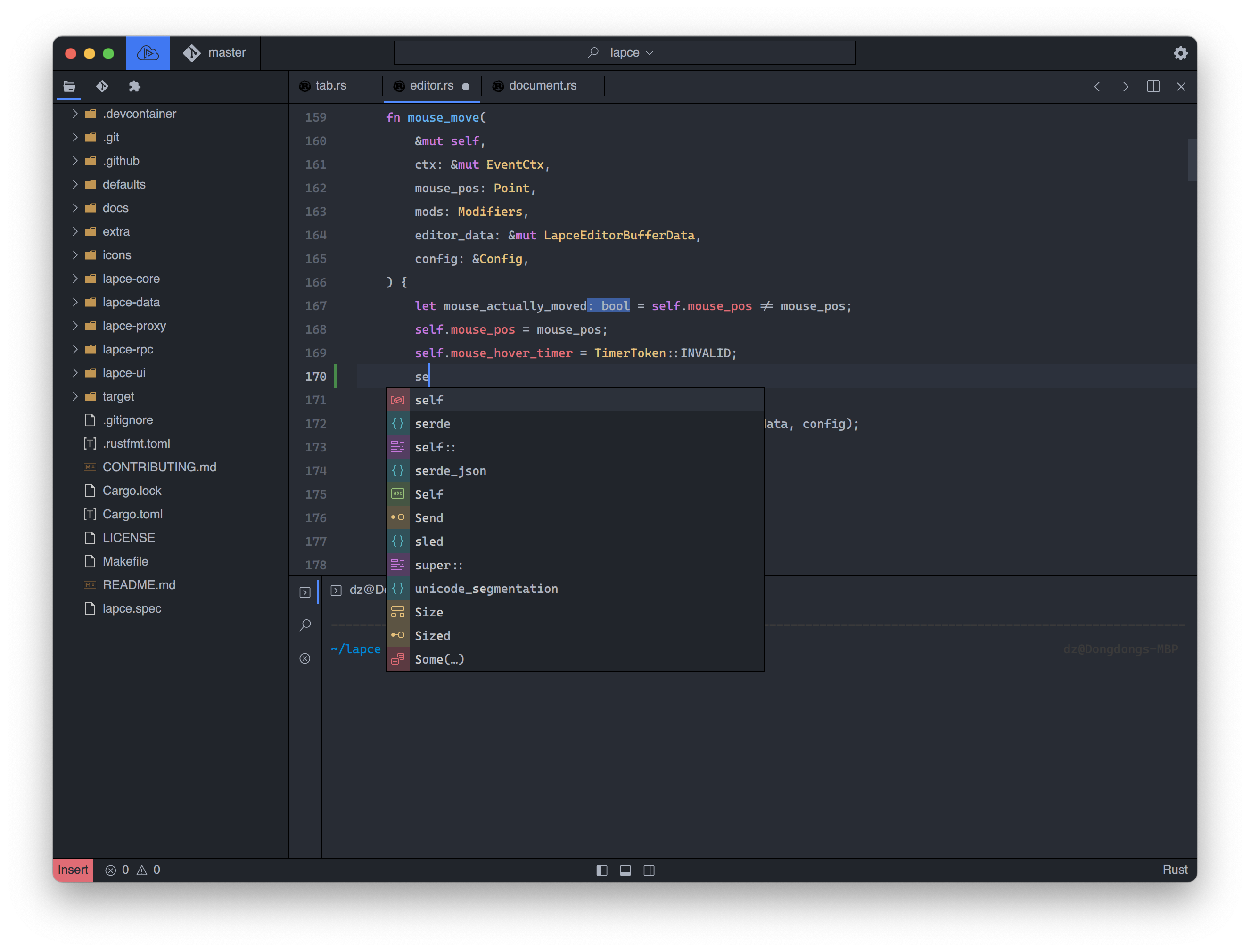
If it’s a day that ends in y, chances are someone is working on a new text/coding editor. We humans just seem to be unable to sit with what we’ve got in this space for any real length of time.
One new-ish Rust-based editor I think you’ll want on your radar is Lapsce (GH). It’s a pretty ambitious project that seems to be on a mission to usurp Visual Studio Code’s crown.
Core features include:
Speed: Lapsce is a native GUI with GPU acceleration in Rust, no more waiting on launching the editor, and any lag on your keystroke will be treated as a bug and get fixed.
Remote-first: you can connect to a remote machine seamlessly, with a “local” experience, benefiting from an identical environment with your production server, or utilizing the full performance of the remote machine.
Code syntax highlighting using Tree-sitter, much faster and better than regex based highlighting. Also with built-in LSP support, to give you code intelligence like code completion, diagnostics, and code actions etc.
WASI plugin system, which means you can write a plugin for Lapce with any programing language that compiles to WASI. Choose a familiar language for writing a plugin without learning a new language.
A built-in terminal
Lapsce is not my daily driver because — for my workflows — it is not ready for prime time. I could not even stomach writing today’s Bonus Drop in it. It has a tiny number of plugins (most of which seem to be theme-related), and too many of the non-theme ones rely on bits built for VS Code for my level of comfort.
Still, it’s an ambitious project with a cult following that does have the potential to steal some marketshare from Microsoft’s editor.
Give it a go and let other subscribers know what your thoughts are on Lapsce.
FIN
I’m still in disbelief that we’ve cranked through ⅓ of the year already. ☮
 hrbrmstr's Daily Drop
Leave a comment