WAT Samples; Spinning Diagrams; Your New JavaScript Playground
I still owe you an extra Bonus, and we’ll see how it goes today, but I had to shunt the weekend Bonus Drop to Sunday b/c of all the 🌍 Day stuff going on yesterday.
Today, we go from low (level) to high as we:
look at a new resource to learn how to wield WASM just above the byte level
check out some cool things you can do with just CSS
and showcase a new playground for hacking JavaScript.
WAT Samples

Before I link to a brief post by Eli Bendersky on WAT (the human-readable textual representation of WebAssembly — WASM — binaries), I feel compelled to go over a bit of background material. Why? Well, my iniital thought was that it’d be a nice refresher. But, the Drop is getting new 👀 almost every day (🙏🏽), so it’s also a good introduction for new readers (who will eventually see this post when it moves from behind the paywall). Jump to the end of the section if you are super comfortable with WASM and WAT.
As you likely know, WASM is a binary instruction format designed as a low-level virtual machine for the web. It aims to provide a compact, fast, and efficient binary format that serves as a compilation target for various programming languages, enabling them to run at near-native speeds in web browsers. WASM provides a portable target for high-performance web applications, allowing developers to build complex and resource-intensive applications that run smoothly in web environments.
WAT stands for “WebAssembly Text Format”, and is, as noted, above, a human-readable representation of WASM code. It is an intermediate format that allows developers to write, read, and debug WebAssembly code more easily than dealing with the raw binary format. WAT exists to provide a more accessible and convenient way to interact with WASM code, as it uses a textual representation similar to assembly languages. It offers a more intuitive way to work with WebAssembly, and can help foster understanding, adoption, and development of WASM-based applications. WAT is also crucial for debugging and optimizing WASM code, as it provides a clear and human-readable way to analyze and modify the binary instructions.
Most of us are who are going to work with WASM are just going to use the JS-wrappers and move on. Some of us are going to rely on Rust/C/Go/etc. + Emscripten to make WASM things for us in a language we already know. Now, I think it helps to be familiar with any given platform’s assembler code (regardless of whatever high-level you code at) — because it will further enhance your overall mental model of how things work. Consequently, I think it makes sense to at least have some passing familiarity with how WASM works. To help convince you, here are some attempts at WAT social engineering.
First, the current state of WASM is buggy. Sure, some things look bulletproof, but they are not. You’ll be able to debug problems (and blame the WASM bits you may just be using) better if you grok WAT as you’ll understand the structure and flow of a WASM program; this also makes it easier to identify and fix errors or identify performance issues.
Second, you may be able to help improve the performance of things you build with WASM, plus knowing how the stack machine works (which I’ll touch on more in a bit) gives you another superpower.
Third, you get to see how each language outputs WASM. Sure, most are going to rely on LLVM to handle the gory details, but not all will. Converting WASM into something readable may help you grok how and why some things work the way they do.
Fourth, you’ll learn some seekrits others, who do not poke below the WASM surface, do not.
Fifth, I think many of you will find it kind of fun!
Overall, learning WAT is beneficial for anyone working with WebAssembly, as it provides a more profound understanding of the technology and empowers developers to create better, more efficient web applications.

Stacked Against (Or, Is It “For”?) Us
I mentioned that WebAssembly uses a stack machine model for its execution semantics, something the resource I’m linking to (in a bit!) talks a bit about. A stack machine is a type of abstract computer that operates using a Last-In, First-Out (LIFO) data structure called — shockingly — a stack. In this model, operands are pushed onto the stack, and operations are performed by popping operands from the stack, applying the operation, and pushing the results back onto the stack. This design choice has several implications and benefits for WASM.
In a stack machine model, there are no explicit registers to hold operands. Instead, operands are stored on the stack, and operations are performed directly on the stack. This design simplifies the WebAssembly virtual machine implementation and allows for a compact binary format, as operands don’t need to be explicitly referenced in the instruction stream.
When executing WASM code, the stack machine processes a series of instructions, where each instruction performs an operation using the values on the stack. For example, if you want to add two numbers, the respective instructions would be:
Push the first number onto the stack.
Push the second number onto the stack.
Execute the “add” instruction, which pops the top two values from the stack, adds them, and pushes the result back onto the stack.
This stack-based approach has several advantages for WASM:
a compact binary format: the lack of explicit operand references in the instruction stream makes WASM code more compact, reducing the size of the binary files and speeding up load times.
wicked efficient execution: stack machines can have simpler and faster implementations due to their straightforward execution model. This results in better performance for WebAssembly applications.
inherently language agnostic: the stack machine model provides a low-level, language-agnostic target for compilers, allowing a wide range of programming languages to be compiled to WebAssembly.
extreme portability: the stack-based execution model is easier to implement across various platforms, ensuring that WebAssembly code runs consistently on different devices and browsers.
bulletproof2 security: the well-defined stack-based execution model, combined with WebAssembly’s sandboxing features, helps to ensure that WASM applications run securely in the browser environment.
With all that out of the way, we close out this section with a link to Eli’s collection of WAT code samples (GH).
Why did Eli make this?
Back to the original goal of this post. While I enjoy writing WAT code, one aspect of the experience that could be improved is documentation. The WASM spec is much more suitable for formal verification than for actual documentation purposes; specifically, it’s hard to grep and doesn’t provide much in terms of examples. This is alright for a spec, but I couldn’t find complementary resources that just show code samples.
Therefore, I’ve decided to collect some of the WAT snippets I’ve written so far…
It looks like Eli is incrementally adding new examples over time, so bookmark it, and watch the repo for new bits of WAT!
Spinning Diagrams

CSS has come a long way since it first came on the scene in December of 1996. The modern form of it is pretty darned handy, too; and, Harold Cooper wielded it quite well in his Visual Sum of Cubes demo. Thankfully, for us mere CSS mortals, he took some time to write-up how it all works.
The core article is short and well-written, so I’ll leave you in Sir Cooper’s capable hands. Make sure to tap the link at the bottom of his post to see some other, clever bits he’s managed to put together over the years.
Your New JavaScript Playground
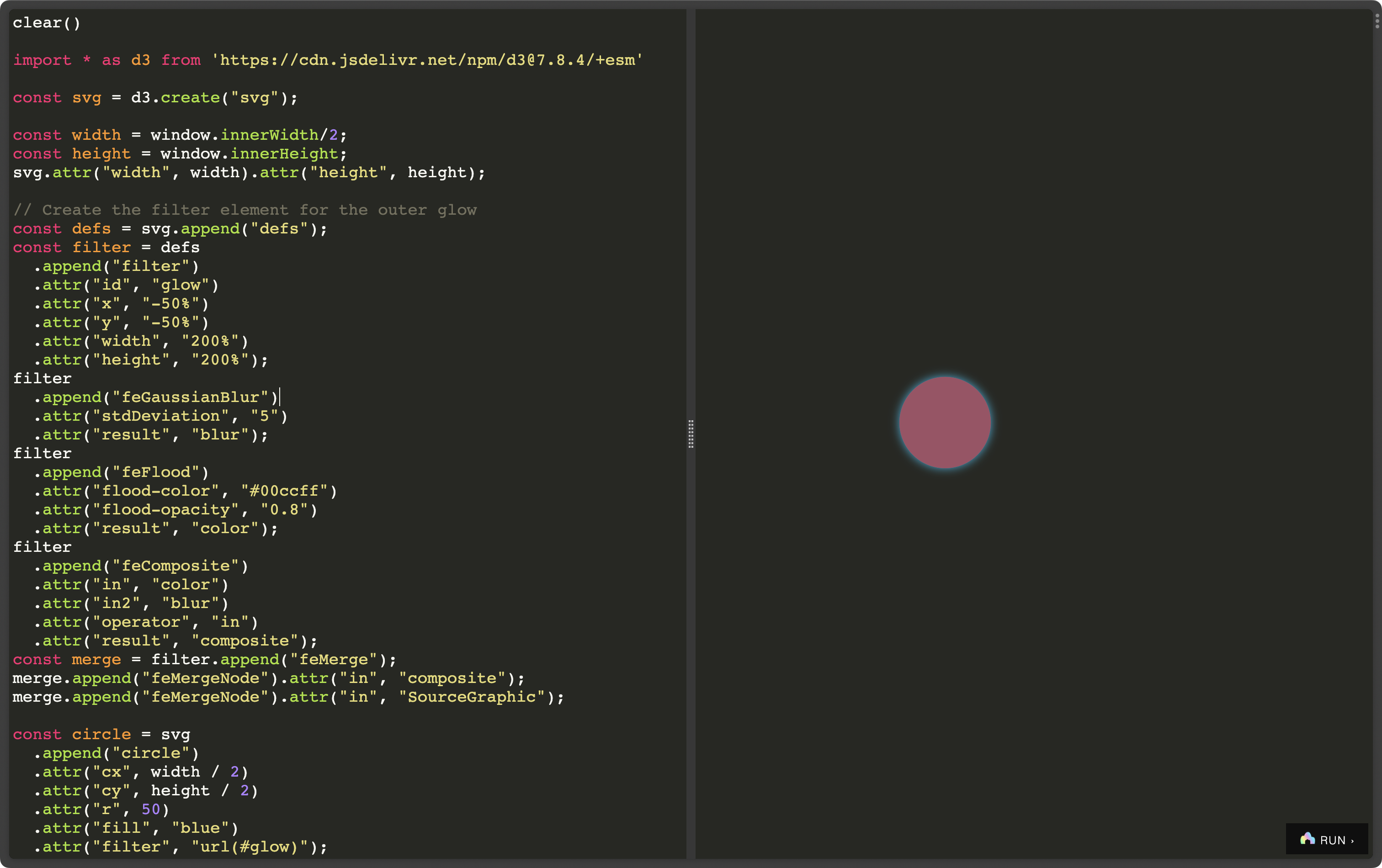
For those who may feel overwhelmed by Observable’s powerful notebooks, and annoyed at how the Developer Tools Console feels/works, you now have a risk free, powerful JS playground that you can run yourself (so, no prying eyes, or third-party services to rely on in JSDen.
Instant feedback is a superpower of scripting languages and REPLs, and JSDen delivers on that promise. You can try it out immediately at jdsen.dev.
Here’s what comes in tin:
JavaScript console emulation
Preview panel
Mobile and tablet friendly
Install as a progressive web app (PWA) for offline use
Light & dark themes
Keyboard shortcuts
Offline support
You are also not overwhelmed with features, since this is what you get:
help()        // - display additional help info
info()        // - more info about JSDen
reset()       // - reset the doc to this tutorial
clear()       // - empty the results
save()        // - save doc state to localStorage
log()         // - log element to results
toggleRunBtn()// - toggle run button
setTheme()    // - set using 'dark' or 'light' theme
resultEl      // - returns result element
To get you started, I threw together a moderately complex D3 example (below) you can paste into JSDen and then hack on. Comment stuff out! Add new code! Break things and try to fix them! Just re-paste the original code to get back to the starting point.
clear() // start fresh

// we need D3!
import * as d3 from 'https://cdn.jsdelivr.net/npm/d3@7.8.4/+esm'

// and we're machinating an SVG
const svg = d3.create("svg");

// mostly deals with the dimensions of the output on the right
const width = window.innerWidth/2;
const height = window.innerHeight;
svg.attr("width", width).attr("height", height);

// Create an SVG filter element for the outer glow
// I rly hate how verbose this feels, but I also remember
// what it was like to do this in the "old days" before the web
// so I won't complain too much.
const defs = svg.append("defs");
const filter = defs
  .append("filter")
  .attr("id", "glow")
  .attr("x", "-50%")
  .attr("y", "-50%")
  .attr("width", "200%")
  .attr("height", "200%");
filter
  .append("feGaussianBlur")
  .attr("stdDeviation", "5")
  .attr("result", "blur");
filter
  .append("feFlood")
  .attr("flood-color", "#00ccff")
  .attr("flood-opacity", "0.8")
  .attr("result", "color");
filter
  .append("feComposite")
  .attr("in", "color")
  .attr("in2", "blur")
  .attr("operator", "in")
  .attr("result", "composite");

const merge = filter.append("feMerge");
merge.append("feMergeNode").attr("in", "composite");
merge.append("feMergeNode").attr("in", "SourceGraphic");

// Now, back to our circle!
// Make one with an initial placement and styling.
const circle = svg
  .append("circle")
  .attr("cx", width / 2)
  .attr("cy", height / 2)
  .attr("r", 50)
  .attr("fill", "blue")
  .attr("filter", "url(#glow)");

// We'll call this in a bit to start the ball rolling (well, bouncing)
// The circle keeps bouncing b/c of what we do in the `.on(…)` part
// at the end.
function moveCircle() {
  circle
    .transition()
    .duration(1000)
    .attr("cx", Math.random() * (width - 100) + 50)
    .attr("cy", Math.random() * (height - 100) + 50)
    .attr("fill", () => "#" + Math.floor(Math.random() * 16777215).toString(16))
    .on("end", moveCircle);
}

resultEl.append(svg.node())

moveCircle();

save()
FIN
Hope you had a most excellent Earth Day! Thanks for your support! ☮
Keeping up with GenZ slang is proving to be a tireless effort.
I kid!!; There is no such thing.
 hrbrmstr's Daily Drop
Leave a comment